
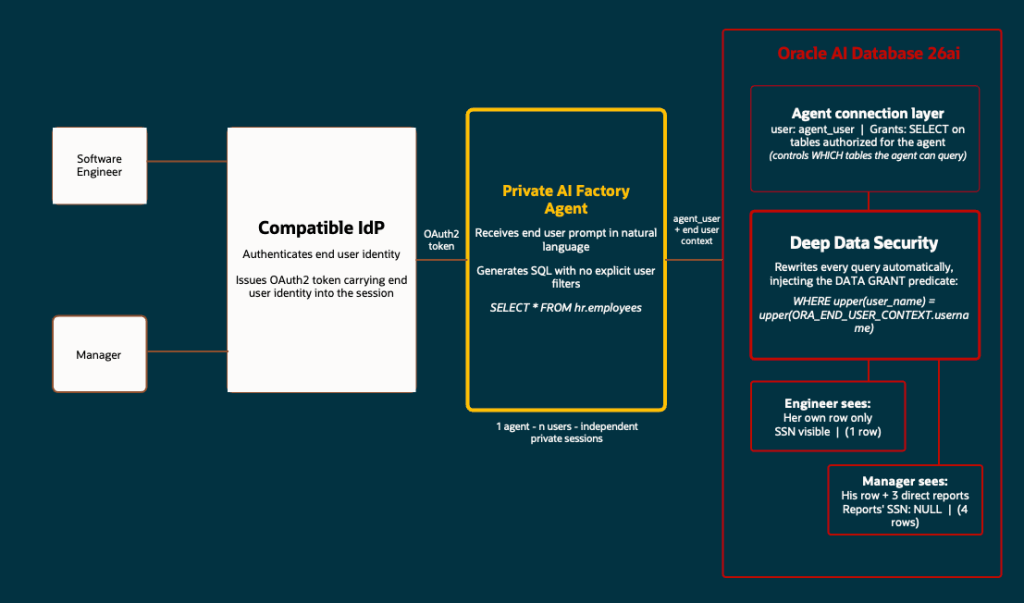
Database architects have applied the same security model for many years: control who can connect to the database and what objects they are allowed to query. That model worked reasonably well when developers were the ones writing the queries. This is not longer the case with AI.
AI agents generate SQL autonomously at runtime, starting from the user’s natural language input. The agent does not know which data is sensitive for which person. The application cannot review queries before they are executed either. And the DBA controls the permissions of the connection pool account; If that pool user has SELECT on a patient table, any agent using it can basically read all it’s rows. Regardless of what the end user should be allowed to.
What is “Deep Data Security”?
Deep Data Security is not a product bundle. It is not an “umbrella name” for various Oracle security features, say SQL Firewall, Database Vault, Real Application Security, etc. It is a database authorization system introduced in Oracle AI Database 26ai that brings identity-aware, row-and-column-level data access control directly into SQL DDL.
DDS introduces new SQL statements ( CREATE END USER, CREATE DATA ROLE, and CREATE DATA GRANT ) that let you define at the database level exactly which rows and columns each end user can read or modify, using their authenticated identity as the enforcement key. The database engine evaluates these rules on every query, regardless of how or by whom that query was generated.
As this recent Oracle’s product blog describes it, DDS “extends and modernizes Oracle Virtual Private Database and Real Application Security, moving from earlier procedural PL/SQL and API-driven controls to declarative policies in SQL.”. It might sound confusing to you because the concepts of row-level predicates and column-level restrictions existed in VPD and RAS. What is new in 26ai is that those concepts are now expressed as native SQL statements, not PL/SQL packages and API calls.
The current problem it solves
The classic architecture in multiuser enterprise applications includes the connection pool: the application maintains a set of shared database sessions running under a single service account, and the application layer is responsible for filtering data per user before returning results.
This works when developers write the queries. But there are two more complex and current scenarios:
A) The first is agentic AI. When an AI agent generates SQL dynamically from a user’s natural language prompt, there is no developer reviewing each statement. The agent can forget to filter, be manipulated through prompt injection, or simply produce a broader query than intended. In a typical deployment, such as Oracle Private AI Factory connecting to the database over MCP, the agent uses a single shared database account on behalf of all end users. If that account has SELECT on a sensitive table, any query the agent generates, for any user, can read the whole thing. Relying on the agent to append the right WHERE clause to every query is not a viable security boundary.
B) The second is vector search in RAG workloads. When the agent runs a semantic search over embeddings, a relational filter can be added to the WHERE clause to restrict results to the current user, but that filter lives inside the query the agent generates. So the same risks apply: the agent can just omit the filter, be manipulated into ignoring it, or produce a query broader than intended. Deep Data Security moves that predicate out of the query and into the database engine, where it applies unconditionally to every search, including similarity searches over vector indexes.
In summary, DDS addresses both scenarios by moving the access control into the database, where it applies to every query.
The three building blocks
DDS introduces three new concepts in 26ai. Understanding them individually makes DDS much easier to understand. We will use the examples in this Oracle Lab as an example:
End User
An end user is a new class of database identity, created with CREATE END USER. It is distinct from a traditional database schema user as it does not own tables or any other database objects. End users exist only to authenticate and to be the subject of data grants.
End users can authenticate directly to the database using a password, or through an enterprise identity provider such as OCI IAM or Microsoft Entra ID (via OAuth2 tokens). Once authenticated their identity becomes available inside the database through ORA_END_USER_CONTEXT.
CREATE END USER emma IDENTIFIED BY Oracle123;CREATE END USER marvin IDENTIFIED BY Oracle123;
This syntax is not the same as CREATE USER. It does not create a schema and has no database privileges by default. It just represents the end user.
But Note: To allow an end user to open a direct database connection (for example, from SQL*Plus or SQLcl), you still have to grant them a standard database role that includes CREATE SESSION. The recommended pattern is to include that grant through a data role. We will talk now about this.
Data Role
A data role is a policy container, created with CREATE DATA ROLE. You attach data grants to a data role. You then grant the data role to one or more end users. When an end user authenticates, the database automatically activates all data roles they have been granted:
CREATE DATA ROLE hrapp_employees;CREATE DATA ROLE hrapp_managers;GRANT DATA ROLE hrapp_employees TO emma;GRANT DATA ROLE hrapp_employees TO marvin;GRANT DATA ROLE hrapp_managers TO marvin;
Data roles can also hold standard database roles. For example, granting CREATE SESSION through a data role ensures that any end user who holds that data role can open a direct connection:
CREATE ROLE direct_logon_role;GRANT CREATE SESSION TO direct_logon_role;GRANT direct_logon_role TO hrapp_employees;
Emma and Marvin both inherit CREATE SESSION through their hrapp_employees data role, without having to grant it individually to each user.
Data Grant
A data grant is a single SQL statement that defines three things: which operations are allowed (SELECT, UPDATE, with optional column lists), which rows are in scope (a WHERE predicate evaluated at query time), and which data role the grant applies to.
CREATE OR REPLACE DATA GRANT hr.hrapp_employee_access AS SELECT, UPDATE(phone_number) ON hr.employees WHERE upper(user_name) = upper(ORA_END_USER_CONTEXT.username) TO hrapp_employees;
The WHERE clause is a standard SQL predicate. It is evaluated at query time against each row. ORA_END_USER_CONTEXT.username resolves to the identity of the authenticated end user at that moment. We can use the dba_data_grants view to check the assigned predicates:
SELECT DISTINCT grant_name, predicateFROM dba_data_grantsWHERE object_owner = 'HR' AND object_name = 'EMPLOYEES';
Column level restrictions work through the SELECT and UPDATE clauses of the data grant. The ALL COLUMNS EXCEPT syntax lets you define exclusions cleanly:
CREATE OR REPLACE DATA GRANT hr.hrapp_manager_access AS SELECT (ALL COLUMNS EXCEPT ssn), UPDATE(salary, department_id) ON hr.employees WHERE manager_id IN ( SELECT m.manager_id FROM hr.managers m WHERE upper(m.mgr_user_name) = upper(ORA_END_USER_CONTEXT.username) ) TO hrapp_managers;
This grant gives managers read access to all columns of their direct reports except “SSN” column, and update access on salary and department_id. Column values outside the grant’s scope are returned as NULL; Oracle Database masks them transparently without returning an error.
How it works in practice?
The Oracle LiveLabs workshop for Deep Data Security uses an HR scenario that shows the model clearly. In the lab, Emma is an engineer. Marvin is her manager. Both connect to the same EMPLOYEES table. Neither of them writes a WHERE clause in their queries because the database adds the data grant predicates automatically.
Setup: the schema-only account
The HR data lives in a schema-only account (something we already know and used in 19c), a user created with NO AUTHENTICATION, which means the schema exists and can own tables, but nobody can log in as HR directly:
CREATE USER hr NO AUTHENTICATION DEFAULT TABLESPACE users;ALTER USER hr QUOTA UNLIMITED ON users;CREATE TABLE hr.employees ( employee_id NUMBER PRIMARY KEY, first_name VARCHAR2(50), last_name VARCHAR2(50), job_code VARCHAR2(10), department_id NUMBER, ssn VARCHAR2(20), phone_number VARCHAR2(30), salary NUMBER(10,2), user_name VARCHAR2(128), manager_id NUMBER);
The user_name column is what the data grant predicate matches against ORA_END_USER_CONTEXT.username at runtime.
Employee perspective
Emma connects as her end user identity. She runs a SELECT with no WHERE clause:
SELECT * FROM hr.employees;
She receives one row (her own data). The database has rewritten the query to add the predicate from hrapp_employee_access. If she explicitly asks for another employee’s record the result is zero rows. The data grant predicate is included with whatever condition Emma writes. She cannot formulate a query that bypasses it. An AI agent acting on her behalf is subject to the same enforcement.
If she tries to update her own salary:
UPDATE hr.employees SET salary = 200000 WHERE first_name = 'Emma';-- 0 rows updated.
The data grant defines UPDATE(phone_number), not UPDATE(salary). The database blocks the operation silently. No error, no rows changed. And if Emma tries to delete records:
DELETE FROM hr.employees;-- ORA-41900: missing DELETE privilege on "HR"."EMPLOYEES"
These two behaviors are actually consistent. UPDATE fails silently because the UPDATE operation is granted to Emma, but only on phone_number. The database finds her row but has no authorized column to update, so nothing changes. This is the same masking principle as SELECT: what falls outside the column scope is suppressed, not rejected. DELETE, on the other hand, raises an explicit error because DELETE is not granted at all.
Manager perspective
Marvin has both hrapp_employees and hrapp_managers. When he queries the table, Oracle Database combines both grants: he sees his own row through the employee grant, and his direct report rows through the manager grant:
SELECT employee_id, first_name, phone_number, salary FROM hr.employees;
Returns four rows: Marvin + Emma, Charlie, and Dana (his employees). Employees in other departments are outside both grants and are invisible.
This union model applies to both rows and columns. If Marvin has two data roles and one exposes a column that the other excludes, the column is visible (the most permissive grant wins). The security implication is straightforward: if a column must never be visible to a given user, none of that user’s data grants can include it. Granting an additional role that exposes the column will make it visible regardless of what other roles restrict.
The key point of ORA_END_USER_CONTEXT
ORA_END_USER_CONTEXT returns a JSON object containing attributes of the currently authenticated end user:
SELECT ORA_END_USER_CONTEXT.username FROM DUAL;USERNAME--------------------------------------------------------------------------------"EMMA"
This function is evaluated at query time, not at session creation time. This means it works correctly in connection pool environments: the pool’s database session may serve multiple users in sequence, and each query picks up the correct identity from the end user context active at that moment.
In production deployments with IAM integration, the end user’s identity goes into the database through OAuth2 tokens issued by OCI IAM or Microsoft Entra ID.
Wrapping up
Agentic AI introduces a risk that traditional database security models were not designed for: SQL generated at runtime on behalf of users who may have very different data access rights, all using the same service account. Trusting the agent to apply the right filters is not a deterministic way to deal with security.
DDS in 26ai addresses this at the DB layer. Also, the new SQL syntax is much much simpler than what VPD and RAS required in the past.
The result is that any query, coming from a developer, an application, or an AI agent, is controlled by the same centralized mechanism within the database. So we will not depend on the application or de AI agent to do it.

