

The progressive adoption of Exascale as a replacement for ASM in Exadata systems introduces a set of key structures that substantially improve extent mapping. These structures, which we reviewed in detail over the past three articles on this blog, enable operations that were previously impossible or highly restricted when using ASM+ACFS or ASM+SparseDG.
In the first part of this article, we will revisit these limitations and the workarounds that we traditionally used to mitigate them. In the second part, we will see how Exascale simplifies these architectures dramatically. This second part will be brief as Exascale is specifically designed to address the existing limitations, meaning that multitenant architectures with Exascale are much simpler – both to implement and to explain.
Limitations of Snapshot Clones in Multitenant with ASM
Let’s use a common, yet very specific, use case to summarize the weaknesses of snapshot clones specifically when operating with ASM+ACFS or ASM+SparseDG: refreshing non-production environments. These refreshes are usually performed periodically to ensure that development and testing are conducted against realistic, up-to-date environments. This process must meet two essential requirements:
- Goal A: Refresh the non-production environment with the most current data possible.
- Goal B: Ensure the operation is simple to implement and lightweight in terms of both resources and time.
Goal A: Refreshing nonprod with the most current Data

In 19c with ASM, we have a number of native operations at our disposal to achieve this goal — even without Exadata:
- The first is creating a refreshable PDB in the non-production environment; indeed, this was the primary reason this capability was introduced. A refreshable PDB maintains an up-to-date image of the production database close to the non-production DBs. We can schedule the refresh frequency as needed, ensuring that the primary database does not accumulate an excessive backlog of archivelogs. The refreshable PDB is in read-only mode.
- The second approach is leveraging a standby database that has already been created for high availability purposes. This is particularly interesting in mixed environments where both non-production databases and production standbys coexist. If we already have a continuously synchronised copy of production in our non-production environment, why not use it? Again, the standby is in read-only mode (Active Data Guard).
- The third option is a more customised approach, using GoldenGate to continuously synchronise specific parts of the production database into different destination PDBs. For example, we might replicate one production schema into one non-production PDB and other schemas into a different PDB. This flexibility is especially useful for testing a new microservices model. The destination PDBs here are in read/write mode.
No major challenges so far. Let’s now move to the second goal.
Goal B: Make the operation lightweight, fast and simple
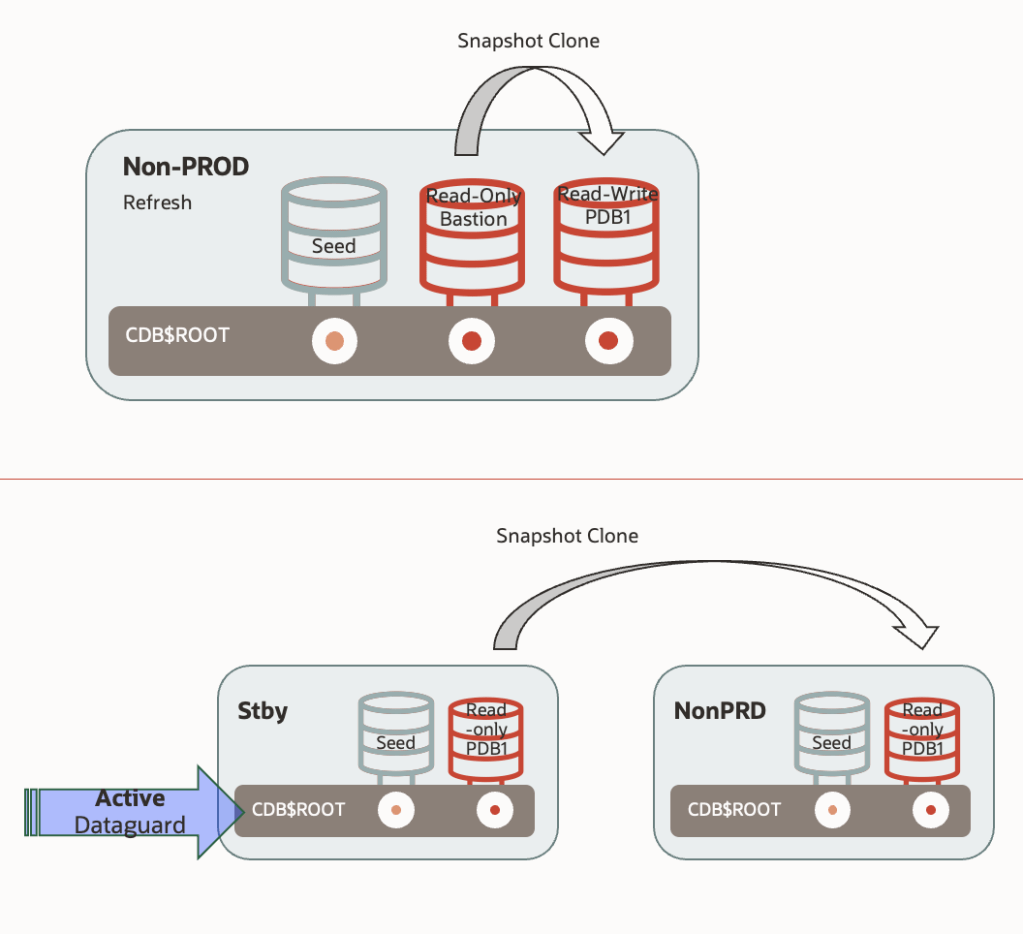
Let’s focus on the two more constrained scenarios: a refreshable PDB or a standby database located in the non-production environment — both in read-only mode. How do we refresh the non-production database?
- By creating a snapshot clone directly from the refreshable PDB (read-only). This is a near-instantaneous operation (depending mainly on the time needed to prepare an undo and temporary tablespace for the snap clone), and it does not require additional storage. In short, refreshing the environment would involve a final “refresh” of the refreshable PDB (two SQL commands), followed by the creation of the snapshot clone (one SQL command). Extremely fast, simple, and efficient.
- By creating a snapshot clone from the standby database into a different CDB within the same infrastructure. For this, we would need to temporarily stop the apply services on the standby. The rest of the process is similar.
Both approaches sound like they were written in a Christmas wish list — simple, powerful, and fast. And indeed, they work exactly as described, with one important caveat: As long as the snapshot clones exist, both the refreshable PDB and the standby database remain locked. They cannot be refreshed. This constraint can undermine both architectures — either because the refreshable PDB risks accumulating too many unshipped redos on the primary (potentially filling the FRA), or because stopping redo apply on the standby compromises the “RTO close to 0” capabilities it was potentially meant to deliver.
Yes, you might wonder whether ACFS could be an alternative to Sparse Diskgroups. Although ACFS does provide copy-on-write capabilities, its performance can degrade under certain conditions. If you’re not familiar with this behaviour, I recommend reviewing the previous articles on this blog, where we examined it in detail.
So, should we abandon these architectures in 19c+ASM? Not necessarily!
The Workarounds
There were several workarounds available for the refreshable PDB approach:

- Use ACFS: One possible workaround was to leverage ACFS to refresh a refreshable PDB even while child PDB clones remained active. However, as noted, performance can degrade with multiple cycles of refresh + child snapclones, especially if older snapclones are retained. Also, ACFS does not support Smart Scan.
- Create two refreshable PDBs instead of one: One would be used to generate snapshot clones, while the other continued to refresh in the background. When a refresh was needed, we would drop the old clones and recreate them from the more updated PDB. Alternatively, based on the primary’s archivelog retention, we could drop and recreate clones as needed. This approach, however, requires additional storage.
- Introduce an intermediate clone: This involves creating a full clone of the refreshable PDB, applying any necessary modifications (e.g., data masking), setting it to read-only, and then generating snapshot clones from it. It adds extra time and storage costs, but provides the opportunity to prepare the database for nonprod use.
What about the standby database approach? We had two main options:

- Creating a dedicated standby solely for refreshing non-production environments. This prevents any impact on RTO objectives. However, it requires doubling the storage footprint and monitoring the growth of unapplied archivelogs on the primary.
- Using an intermediate clone, similar to the refreshable PDB scenario: stopping apply services temporarily to create a full clone of the standby into a separate CDB, customising it, setting it to read-only, and creating snapshot clones from there.
Thus, while there were solutions in 19c, they were not that “immediate” as we initially thought.
Exascale: The solution
Most would agree that the ideal solution would allow us to implement the initial architecture without complex workarounds: Just create a refreshable PDB in the nonprod environment, spawn snapshot clones as needed, and refresh the parent PDB periodically — all while keeping everything simple and efficient.
As we saw in previous Exascale articles, this is now possible natively. Exascale’s redirect-on-write feature allows us to modify the parent PDB while active snapshot clones remain — without performance degradation. And that’s not all. Exascale enables even more ambitious yet simple architectures, such as the following one:
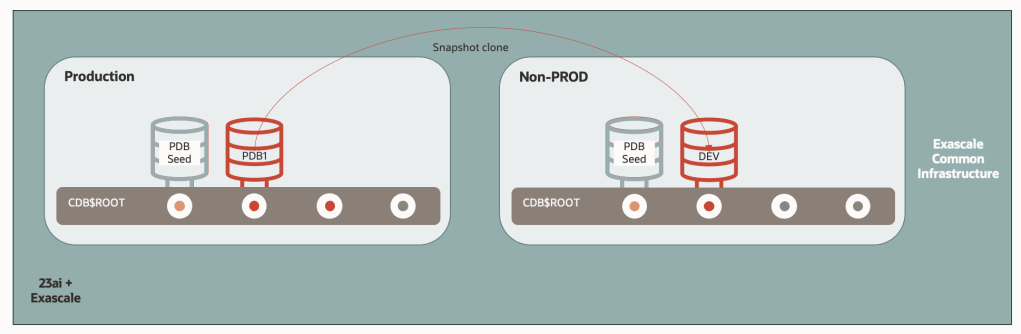
In this design, we create non-production database as direct snapshot clone from the production database itself — without needing an intermediate refreshable PDB or standby DB.
Since Exascale Pools are accessible from any Virtual Cluster within the same Exadata infrastructure (the same Exascale VAULT specifically), it’s feasible to maintain one Virtual Cluster for production and another VC for non-production, and generate snapshot clones across them. Refreshing the environment would be as simple as two SQL commands (drop and create), with minimal space overhead.
That said, although technically viable, this setup might not suit typical enterprise needs, where non-production databases often require adjustments such as data masking, user account modifications, or structural changes. Thus, maintaining an intermediate copy might still be necessary due to functional needs.
In that case, of needing an intermediate copy, It would be great to have the capability to create a snapshot clone from a snapshot clone in Exascale. Well, press the play button to The Beach Boys “Wouldn’t It Be Nice” and watch this:

So, a snapshot clone from Prod database to the nonprod environment, where we will be performing the Datamasking and other sort of adaptations, and then, deliver the refreshed nonprod databases as snapshot clones from it.
Wrapping up
Although the SQL commands for creating snapshot clones in Exascale are identical to those used with ASM, Exascale’s Thin Provisioning capabilities simplify and optimise many of our operational processes. Refreshing non-production environments, creating large numbers of read/write clones for data science, or provisioning instant environments for informational purposes are just a few examples where Exascale shines.
By the way — did you know that you can already select Exascale instead of ASM when creating a new Virtual Cluster in ExaC@C? This means we now have three types of VM Clusters available in ExaC@C: VMCluster/ASM, VMCluster/Exascale, and Autonomous VMCluster:

If you are an ExaC@C user, there’s no better time to start testing Exascale!
 Oracle and Me