
So, you want to move to Oracle Cloud ! but you are not feeling so enthusiastic about the migration process. Most of your databases are still Non-CDB and wish to find some magical procedure to move them without hassle, including:
- Architecture conversion (Non-CDB to PDB)
- Minimum downtime, regardless of the DB size
- Consolidating several DBs into a single CDB in OCI
- Should work from 12.2 onwards, with particular attention to 19c
- Easy procedure, please
Do you need a fancy new DB feature for this? Nope. Now, try to guess the solution considering the following premises (which are all true):
- You can directly create a PDB from a Non-CDB – reusing datafiles or duplicating datafiles.
- You can also create a PDB from a Non-CDB using a DBLink. In this case you will be duplicating datafiles.
- In both cases, you will use noncdb_to_pdb.sql script to convert the DB dictionary into a PDB type, and establish the horizontal partitioning (the link between the new PDB and the CDB) of the CDB-PDB dictionary .
- Refreshable PDBs (you may want to check my older posts to recap) let you perform a remote full clone while source PDB is still fully operational, then program several refreshes on the refreshable PDB and open it read-only when necessary.
So how can we make our wishlist come true? . Creating a refreshable PDB in OCI from the onpremises Non-CDB and converting it to a read-write database afterwards.

So we start creating our refreshable PDB. Keep in mind that this can take a while; it is a full remote copy after all. The larger the DB, and the higher transactionality, the bigger the recovery size dest on the source database will be needed, as any archive log created since the beginning of the copy operation will be claimed later by the refreshable PDB on the first refresh. Thus, it is a good idea to schedule frequent refreshes to prevent the accumulation of too many archivelogs in the source DB. Keep in mind that we don’t have any specific archivelog deletion policy like the ones we have with Dataguard to avoid archivelog deletion on the “primary” (source) database before they are applied on the “standby” (refreshable) so we need to avoid filling the source DB recovery area. Oh, and you may want to remove any explicit archivelog deletion command like “backup archivelog all delete all input“. Try to let the fast recovery area to delete them upon space pressure.
You may also want to do some math first; make some tests to know your bandwidth, take note of the redo log generation rate you will expect based on historical data and timeframe, and have a magnitude idea on how much time your full db copy will take and how much space in FRA you will need to cover that time window.
Please note: I will take for granted that this particular Non-CDB is compatible with the target CDB. If you are not sure, remember to use the DBMS_PDB.CHECK_PLUG_COMPATIBILITY pl/sql to double check first.
-- Source Non-CDB db:

SQL> select cdb from v$database;
CDB
---
NO

SQL> show parameters db_name
NAME		     TYPE	 VALUE
------------------- ----------- ------------------------------
db_name              string	 mibd

SQL> create user noncdbrefresh IDENTIFIED BY We1c0m3_We1c0m3_;
User created.

SQL> grant create session,create pluggable database, sysoper to noncdbrefresh;
Grant succeeded.

----------------------------------------------
----------------------------------------------
----------------------------------------------

-- Target Container database:

SQL> select cdb from v$database;
CDB
---
YES

SQL> show parameters db_name
NAME		     TYPE	 VALUE
-------------------- ----------- ------------------------------
db_name 	     string	 RAC19

SQL> alter system set global_names=FALSE scope=both;
System altered.

SQL> CREATE DATABASE LINK clonelink CONNECT TO noncdbrefresh IDENTIFIED BY We1c0m3_We1c0m3_ USING 'MIBD';
Database link created.

SQL> select sysdate from dual@clonelink;
SYSDATE
---------
26-SEP-24

SQL> create pluggable database NEWOCIPDB from non$cdb@clonelink refresh mode manual;
Pluggable database created.

SQL> show pdbs

    CON_ID CON_NAME			  OPEN MODE  RESTRICTED
---------- ------------------------------ ---------- ----------
	 2 PDB$SEED			  READ ONLY  NO
	 3 NEWOCIPDB			  MOUNTED

Now, within the migration window, we will perform a last refresh on the PDB. Keep in mind that the refresh action itself will still need the source DB to be open; even when we only need archivelogs, the conversation has to take place in order to identify what is needed and to proceed with the retrieval. Being a last refresh, you may want to close the client services and only keep the refreshable DB service up; so before creating the dblink you might want to create a specific dynamic service for the refreshable PDB.
To make a little more realistic exercise, we will perform some changes on the source database before performing the last refresh. Notice that after the refreshable PDB creation, new DDLs/DMLs will probably have occurred; inbetween the refreshable PDB creation and after it’s creation. So we want to be sure that the last refresh is taking up to the latest change. This is a very simple way to do it:
-- Source Non-CDB db:
SQL> create table system.test ( anything varchar2(3) );
Table created.

SQL> insert into system.test (anything) values ('ABC');
1 row created.

SQL> commit;
Commit complete.


-- Target Container database:
SQL> alter pluggable database NEWOCIPDB refresh;
Pluggable database altered.

SQL> exit

--Now we can safely shut down source DB. This will remain intact and available in case we need to fall back:

[oracle@frivas1 ~]$ . mibd.env
[oracle@frivas1 ~]$ srvctl stop database -d mibd -o immediate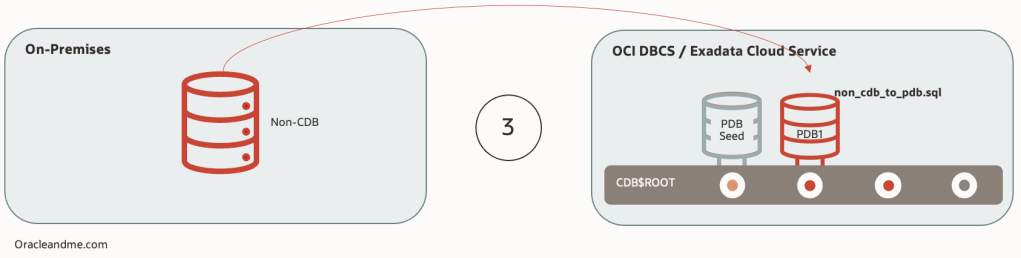
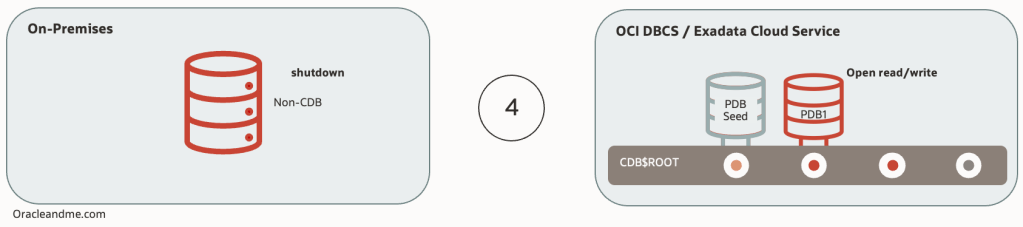
Here is the specific nuance with this approach; this is a refreshable PDB with a Non-CDB dictionary. This means that we need to complete 2 tasks; converting from refreshable to read/write, and then, finish the Non-CDB to PDB conversion, where it’s own dictionary is cleaned up from infrastructure stuff, and horizontal partitioning is established with the CDB$ROOT. Operations order is relevant, as dictionary transformation will not be able if we don’t transform it from refreshable to read/write PDB first. The process itself cannot be simpler:
-- Target Container database:
SQL> show pdbs

    CON_ID CON_NAME	  OPEN MODE  RESTRICTED
---------- -------------- ---------- ----------
	 2 PDB$SEED	  READ ONLY  NO
	 3 NEWOCIPDB	  MOUNTED


SQL> alter pluggable database NEWOCIPDB refresh mode none;
Pluggable database altered.

SQL> alter session set container=NEWOCIPDB;
Session altered.

SQL> @$ORACLE_HOME/rdbms/admin/noncdb_to_pdb.sql
[...]
After the successful execution of the Non-CDB to PDB script, our new OCI PDB will remain in mount status. We can now proceed to open it and verify whether the last changes before the last refresh are there:
-- Target Container database:
SQL> show pdbs

    CON_ID CON_NAME           OPEN MODE  RESTRICTED
---------- ------------------ ---------- ----------
         3 NEWOCIPDB          MOUNTED

SQL> show con_name

CON_NAME
------------------------------
NEWOCIPDB

SQL> select status from v$instance;

STATUS
------------
MOUNTED
1 row selected.

SQL> alter pluggable database NEWOCIPDB open;
Pluggable database altered.

SQL> select open_mode from v$database;
OPEN_MODE
--------------------
READ WRITE
1 row selected.

SQL> select * from system.test;
ANY
---
ABC
1 row selected.

-- Confirming we have no issues with read/write

SQL> insert into system.test (anything) values ('OCI');
1 row created.

SQL> commit;
Commit complete.

SQL> select * from system.test;
ANY
---
ABC
OCI
2 rows selected.
As you can see, it is indeed possible to migrate to OCI with a simple, minimum downtime method that will also convert your database to a PDB in a single movement.
We have done this process manually for the sake of the example, but If you want an even easier and safer approach, the way to go is using Autoupgrade. This is an exceptionally useful tool that will help you performing all the necessary steps before and after the process and will execute the right commands in the right order. Autoupgrade is free and works at 4am as fine as 10am without the need of coffee.
 Oracle and Me