

Following my previous post about PDB hot clones in a Data Guard environment, I received several questions from you about the different scenarios one might encounter in a physical Data Guard setup with PDBs. I believe the best way to address this is by delving into one of the most complex cases, which is the multitenant-asymmetric physical Data Guard. If we can totally comprehend that scenario, we will be able to understand almost any other scenario related to physical DG and PDBs.
So this is the first part of a series of articles where we will explore these various scenarios and eventually understand how to manage an asymmetric physical Data Guard – to have a primary hosting a different number of PDBs than the standby/s – and the implications it carries.
Come on! Are you going to bore us with this? Get to the point and share some juicy SQL commands already!
Believe me, it’s an interesting read. You will see how crucial it is to get the fundamentals to step out of the shadows and completely lose your fear of multitenant and Data Guard.
Before we dive in: although there are new possibilities starting from 21/23c, we will be discussing situations applicable to both 19c, 21, and 23c. All the examples will be related to a 19c; as the release with the highest installed base nowadays.
The core architecture of physical Data Guard in a multitenant environment is very similar to the non-CDB architecture. In a multitenant database, the CDB$ROOT is the one controlling the instance, starting processes from the $ORACLE_HOME (RDBMS binary installation) and allocating a memory chunk from the OS for the SGA (not to mention PGA later on). So it is the CDB$ROOT the one managing the control file, spfile, and also the REDO LOG groups. This implies that the PDBs operating within the same CDB share the same log buffer inside the SGA and the same REDO LOG groups. Consequently, regardless of the Data Guard protection mode, the REDO will inevitably contain transactions from all PDBs within the container.
Our “raw material” (the REDO) is created in this manner at the source and cannot be altered or customized as of today. Consequently, Data Guard transport services will always be carrying transactions from all PDBs to the standby.
On the other hand, we have the apply services of Data Guard (recovery service), which takes this “raw material” and apply it to the standby CDB (which in turn also writes these applied transactions in its own REDO LOG). This means that the standby has a recovery process that reads transactions from the REDO coming from the primary, and thus, it has the capability to discern whether the transaction belongs to one PDB or another. We can already anticipate that we will have the option to decide which PDBs will be synchronized on the standby, but let’s not rush. Let’s go through other matters before we delve into that.
Ok, but beyond that appreciation, setting up a Data Guard for a multitenant environment is straightforward in itself, isn’t it?; restoring the CDB in the standby site for a standby use and configuring the DG (hopefully through a broker). Well, yes, but the interesting part is not in that initial scenario. What interests us is understanding what happens to the physical Data Guard when we perform a PDB operation in the Primary database while the dataguard was already up and running… What happens on the standby if I plug in an external PDB on the primary? Will the plug-in also happen in the standby? What if it’s a local clone? What about a remote clone? What if it’s simply creating a new PDB?.
What relationship exists between this standby REDO PDB discrimination capability and these particular scenarios?. And how both things can lead to an asymmetric DG?.
Let’s start with these particular scenarios and move forward from there.
Use case: PDB creation
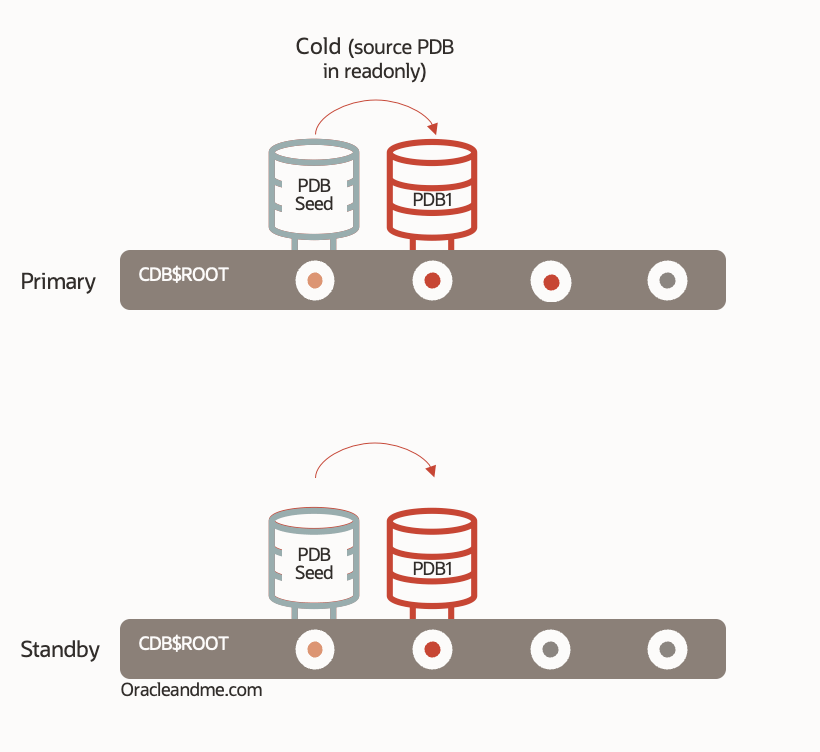
One of the key concepts to bear in mind when working with Data Guard and PDBs is that the PDB operations on the primary database will be replicated/re-executed – via the REDO stream – in the standby database. The “create pluggable database PDB1 […]” command will also be attempted on the standby database.
Understanding that creating a brand new PDB is essentially a PDB$SEED local clone (along with the corresponding renaming of various names and attributes), we can deduce that this operation can be successfully replicated on the standby. Why? Because the standby CDB also/already has its PDB$SEED. The PDB$SEED datafiles are available there as well, so when the recovery process on the standby receives and executes the “create pluggable database” command, it will find the “source” PDB datafiles in its own local storage and will proceed to replicate the clone operation locally.
Additionally – and this point is crucial to understand the subsequent scenarios – creating a new PDB is a cold clone. The PDB$SEED is in READ-ONLY mode, and its datafiles are consistent. Hence, the recovery process in the standby CDB is autonomous to perform the task, unlike the PDB hot-clone scenario – I explain in detail in this article and will further develop in part 2 .
Therefore, the use case of creating a new PDB in a physical Data Guard primary, for the purpose of this explanation, is the same as cold cloning a user PDB while opened in read-only mode.
Use Case: PDB Unplug
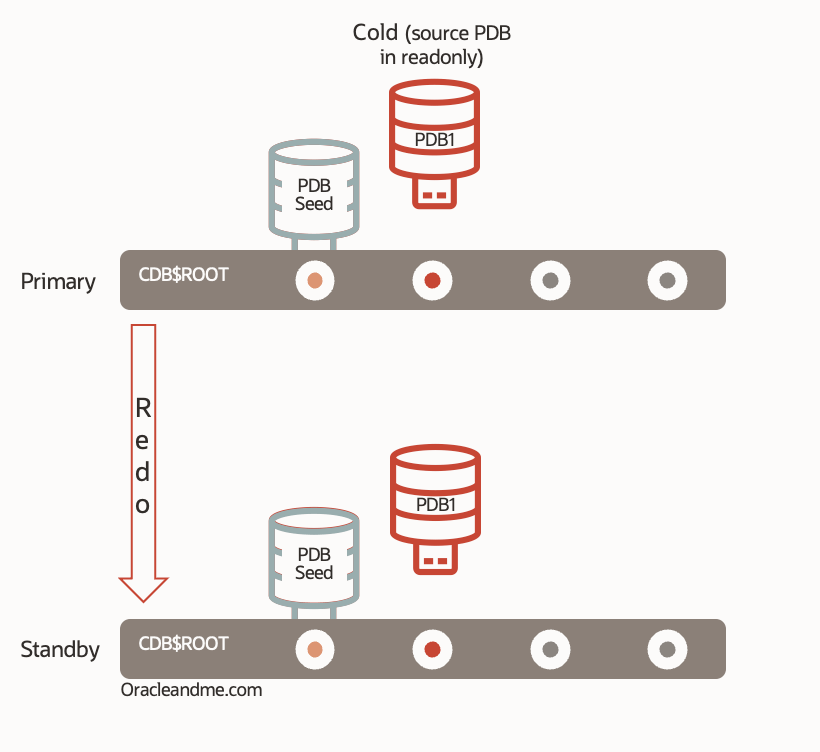
A PDB unplug operation on a primary database is inherently cold because we need to close it first before performing the actual unplug command . So we can already deduce that the recovery on the standby will be sufficient to execute the unplug command; it’s cold and we don’t need new datafiles. Moreover, the unplug command will be replicated on the standby as well. So If I do this (feedback removed):
SQL> show pdbs

    CON_ID CON_NAME		  OPEN MODE  RESTRICTED
---------- -------------------- ---------- ----------
	 2 PDB$SEED		  READ ONLY  NO
	 3 PDB1 		  READ WRITE

SQL> alter pluggable database PDB1 close immediate;
SQL> alter pluggable database PDB1 unplug into '/tmp/PDB1.xml' encrypt using xxx;
SQL> drop pluggable database PDB1 keep datafiles;

SQL> show pdbs

    CON_ID CON_NAME		  OPEN MODE  RESTRICTED
---------- -------------------- ---------- ----------
	 2 PDB$SEED		  READ ONLY  NO
PDB datafiles will not be deleted from the standby CDB either (keep datafiles being the default actually). If you check the standby’s alert log, you will see that they are removed from the control file but not from the storage (In the next exercise we will need these datafiles, so we will put this statement to test anyhow):
PDB1(3):Deleted Oracle managed file +DATA/TDEA_fra1mp/D8DB81B0EEE416F0E0537200000A624B/TEMPFILE/temp.277.1098272431
PDB1(3):Recovery deleting tempfile #4:'+DATA/TDEA_fra1mp/D8DB81B0EEE416F0E0537200000A624B/TEMPFILE/temp.277.1098272431'
PDB1(3):Recovery dropped temporary tablespace 'TEMP'
PDB1(3):Recovery deleting file #12:'+DATA/TDEA_fra1mp/D8DB81B0EEE416F0E0537200000A624B/DATAFILE/users.269.1097603871' from controlfile.
PDB1(3):Recovery dropped tablespace 'USERS'
PDB1(3):Recovery deleting file #10:'+DATA/TDEA_fra1mp/D8DB81B0EEE416F0E0537200000A624B/DATAFILE/undotbs1.267.1097603869' from controlfile.
PDB1(3):Recovery dropped tablespace 'UNDOTBS1'
PDB1(3):Recovery deleting file #9:'+DATA/TDEA_fra1mp/D8DB81B0EEE416F0E0537200000A624B/DATAFILE/sysaux.266.1097603861' from controlfile.
PDB1(3):Recovery dropped tablespace 'SYSAUX'
PDB1(3):Recovery deleting file #8:'+DATA/TDEA_fra1mp/D8DB81B0EEE416F0E0537200000A624B/DATAFILE/system.265.1097603859' from controlfile.
PDB1(3):Recovery dropped tablespace 'SYSTEM'
PDB1(3):Recovery dropped pluggable database 'PDB1'
So when unplugging the PDB on the primary, I not only have a consistent copy of the datafiles and the manifest file at the primary site, but I also have a consistent copy of the datafiles on the standby. And this can be very helpful, especially if the standby is located in another region and I plan to recreate it in a different server from the same region – along with plenty other possibilities.
Use Case: PDB Plug

In the previous case of creating an empty PDB – a PDB$SEED cold clone – we understand that when cloning a PDB in a physical Data Guard environment, we must ensure that the the source PDB datafiles are available to the standby CDB; otherwise, it cannot perform the equivalent cloning on the standby. The datafiles need to be copied to the standby if they are missing. Don’t expect the standby_file_management parameter to work miracles; it will only be effective with new and empty datafiles.
Now, following the PDB unplug exercise using the ‘keep datafiles’ option where the datafiles remain where they were, both in the primary and the standby; what do you think will happen if we plug the same PDB back into the same primary? Correct, it will work seamlessly on both the primary and the standby because the datafiles were already in the right location. So we plug-in in primary:
SQL> create pluggable database PDB1 using '/tmp/PDB1.xml' KEYSTORE IDENTIFIED BY xxx decrypt using xxx;
SQL> alter pluggable database PDB1 open;
Now lets check the standby alert log:
2022-03-04T13:02:31.989889+00:00
Recovery created pluggable database PDB1
PDB1(5):Recovery scanning directory +DATA/TDEA_fra1mp/D8DB81B0EEE416F0E0537200000A624B/DATAFILE for any matching files
PDB1(5):Datafile 19 added to flashback set
PDB1(5):Successfully added datafile 19 to media recovery
PDB1(5):Datafile #19: '+DATA/TDEA_fra1mp/D8DB81B0EEE416F0E0537200000A624B/DATAFILE/system.265.1097603859'
PDB1(5):Datafile 20 added to flashback set
PDB1(5):Successfully added datafile 20 to media recovery
PDB1(5):Datafile #20: '+DATA/TDEA_fra1mp/D8DB81B0EEE416F0E0537200000A624B/DATAFILE/sysaux.266.1097603861'
PDB1(5):Datafile 21 added to flashback set
PDB1(5):Successfully added datafile 21 to media recovery
PDB1(5):Datafile #21: '+DATA/TDEA_fra1mp/D8DB81B0EEE416F0E0537200000A624B/DATAFILE/undotbs1.267.1097603869'
PDB1(5):Datafile 22 added to flashback set
PDB1(5):Successfully added datafile 22 to media recovery
PDB1(5):Datafile #22: '+DATA/TDEA_fra1mp/D8DB81B0EEE416F0E0537200000A624B/DATAFILE/users.269.1097603871'
Here’s another interesting thing: the CDB doesn’t just sit there waiting for datafiles; it actively searches for them. It scans the items present in the GUID folder and identifies the necessary PDB datafiles. Once identified, it incorporates the PDB into the dataguard standby main recovery process.
And if, for any reason, it’s more convenient for us to leave the datafiles in another non-permanent server location (lets say a NFS mount point), and want Oracle to copy them to the final location (lets say ASM) we can also use the standby_pdb_source_file_directory system parameter in the standby database. We will be executing the plug-in operation with the COPY attribute and the database will handle the identification process within that alternate location, physically copy the files to db_create_file_dest – or the specified alternative location – and ultimately create the clone there. Eg:
--After copying PDB1 datafiles into /myNAS/migration/datafiles on the standby site:
SQL> alter system set standby_pdb_source_file_directory='/myNAS/migration/datafiles' scope=both;

--Primary database:
SQL> create pluggable database PDB1 using '/tmp/PDB1.xml' COPY KEYSTORE IDENTIFIED BY xxx decrypt using xxx;
Standby database alert log excerpt:
2022-03-04T13:21:05.6854786+00:00
Recovery created pluggable database PDB1
Recovery attempting to copy datafiles for pdb-PDB1 from source dir-/myNAS/migration/datafiles
2022-03-04T13:21:05.7512544+00:00
Recovery copied files for tablespace SYSTEM
Recovery successfully copied file +DATA/TDEA_fra1mp/D8DB81B0EEE416F0E0537200000A624B/DATAFILE/system.265.1097603859 from /myNAS/migration/datafiles/system.265.1097603859
PDB1(5):Successfully added datafile 19 to media recovery
PDB1(5):Datafile #19: '+DATA/TDEA_fra1mp/D8DB81B0EEE416F0E0537200000A624B/DATAFILE/system.265.1097603859'
As described in this oracle support note, you don’t need an Active Data Guard license to use the standby_pdb_source_file_directory system parameter.
Main take-aways of this 1st part:
- The creation of new PDBs in a physical DG primary database is transparent and automatic. They will automatically be created in the standby and merge into its main DG recovery process.
- The PDB unplug/plug operations in a primary DB is transparent provided we have manually copied the PDB datafiles additionally to the standby server (either to its final location or a temporary one). And the datafiles copy must be done before executing the plug-in command in the primary DB. If you do it in the reverse order, get ready to read the third part of this series.
This will be all for today! In the following Part 2 we will continue talking about hot clones (both local and remote) and we will learn to manage an asymmetric DG .
 Oracle and Me
One response to “Asymmetric Dataguard with multitenant (Part 1)”
[…] This is the second part of the article series on asymmetric physical dataguard with multitenant. You can find the first part in this link. […]
LikeLike