
In one of the previous articles I superficially mentioned a relevant limitation in the combination of Multitenant + Dataguard in 19c: It simply cannot execute a synchronized hot cloning (primary cloning cascading to the standby). Today we are going to address that issue in detail, and we will discover an important improvement that we find in 23c, inherited almost untouched from 21c. We will start as always with a bit of context.
As you can see in the following diagram, performing a cold clone in a 19c physical dataguard environment is pretty simple. We first set the primary PDB “PDB1” in read-only mode so we don’t have fuzzy datafiles, and then execute the “create pluggable database PDB1clone from PDB1“. This command will be carried over through the REDO stream to the physical standby. As PDB1 datafiles are also present in the physical standby site, the standby database will just repeat the clone command locally. So basically with 19c performing a cold PDB clone on the Primary site will be effective on both Primary and Standby sites. Cloned PDB does not need to be recovered as it’s datafiles are already consistent. :

On the other hand we have the PDB hot cloning. Since the introduction of PDB local undo in 12.2, we know it’s possible to clone a PDB opened in read-write mode; it is possible to do a hot clone. So in that case, datafiles are copied in a fuzzy state, but once finished, a recovery process will take care of making them consistent using REDO and UNDO data.
But, what about the standby site?. The cloning command would be carried over via REDO stream and be executed there as well. But it will not happen, and this is because a technical limitation of 19c – and lower – releases. The most common state of a physical standby is to be applying the REDO coming from the primary. To have its recovery services enabled. This implies that the standby CDB is undergoing a continuous recovery process. If we try to execute a hot clone in the standby, it would need to open an additional and parallel recovery process for the new PDB. But such a case is not foreseen in the 19c development :
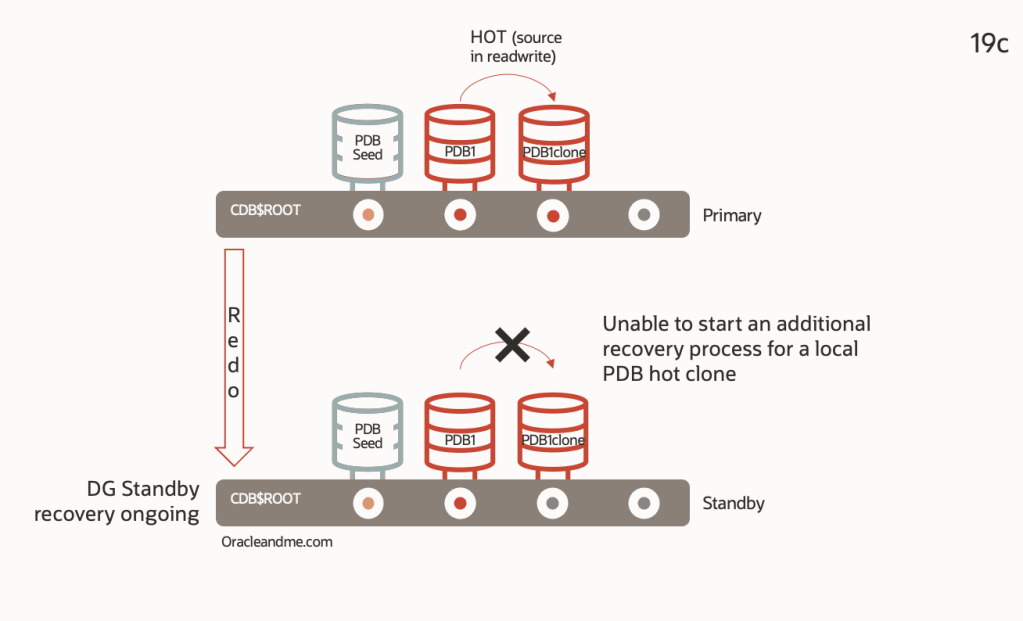
Ok, so what happens if we execute a PDB hot clone in a 19c Primary database?. Well, it will be executed on the primary, but not in the standby DB. This is, the hot clone command will be implicitly executed with the argument “standbys=none”, and you will need to manually restore the PDB on the standby site later.
How it works since 21c onwards
In a few words; hot cloning also works on the standby site in a Physical DG. Take a look to the following example where you can see what steps will be triggered upon a PDB hot clone on the primary side :

- The hot clone operation will be sent through the REDO stream and detected by the physical standby
- The new “PDB1clone” in standby side is created isolated from the ongoing CDB active dataguard recovery. An independent recovery process will take care of the hot clone. It will remain isolated until the end of the clone operation.
- Clone operation is finished and “PDB1clone” is no longer isolated. “PDB1clone” is now included in the ongoing CDB dataguard recovery.
Let’s delve into this example with a little more detail. On the primary site:
DGMGRL> show configuration verbose

Configuration - CDBA_frankfurt_CDBA_madrid

  Protection Mode: MaxAvailability
  Members:
  CDBA_frankfurt - Primary database
    CDBA_madrid    - Physical standby database

  Properties:
    FastStartFailoverThreshold      = '30'
    OperationTimeout                = '30'
    TraceLevel                      = 'USER'
    FastStartFailoverLagLimit       = '0'
    CommunicationTimeout            = '180'
    ObserverReconnect               = '0'
    ObserverPingInterval            = '0'
    ObserverPingRetry               = '0'
    FastStartFailoverAutoReinstate  = 'TRUE'
    FastStartFailoverPmyShutdown    = 'TRUE'
    BystandersFollowRoleChange      = 'ALL'
    ObserverOverride                = 'FALSE'
    ExternalDestination1            = ''
    ExternalDestination2            = ''
    PrimaryLostWriteAction          = 'CONTINUE'
    ConfigurationWideServiceName    = 'CDBA_CFG'
    ConfigurationSimpleName         = 'CDBA_frankfurt_CDBA_madrid'
    DrainTimeout                    = '0'

Fast-Start Failover:  Disabled

Configuration Status:
SUCCESS

DGMGRL> show database verbose CDBA_madrid

Database - CDBA_madrid

  Role:                PHYSICAL STANDBY
  Intended State:      APPLY-ON
  Transport Lag:       0 seconds (computed 1 second ago)
  Apply Lag:           0 seconds (computed 1 second ago)
  Average Apply Rate:  5.00 KByte/s
  Active Apply Rate:   0 Byte/s
  Maximum Apply Rate:  0 Byte/s
  Real Time Query:     ON
  Instance(s):
    CDBA

  Properties:
    DGConnectIdentifier             = 'CDBA_madrid'
    ObserverConnectIdentifier       = ''
    FastStartFailoverTarget         = ''
    PreferredObserverHosts          = ''
    LogShipping                     = 'ON'
    RedoRoutes                      = ''
    LogXptMode                      = 'SYNC'
    DelayMins                       = '0'
    Binding                         = 'optional'
    MaxFailure                      = '0'
    ReopenSecs                      = '300'
    NetTimeout                      = '30'
    RedoCompression                 = 'DISABLE'
    PreferredApplyInstance          = ''
    ApplyInstanceTimeout            = '0'
    ApplyLagThreshold               = '30'
    TransportLagThreshold           = '30'
    TransportDisconnectedThreshold  = '30'
    ApplyParallel                   = 'AUTO'
    ApplyInstances                  = '0'
    ArchiveLocation                 = ''
    AlternateLocation               = ''
    StandbyArchiveLocation          = ''
    StandbyAlternateLocation        = ''
    InconsistentProperties          = '(monitor)'
    InconsistentLogXptProps         = '(monitor)'
    LogXptStatus                    = '(monitor)'
    SendQEntries                    = '(monitor)'
    RecvQEntries                    = '(monitor)'
    HostName                        = 'db21cremote'
    StaticConnectIdentifier         = '(DESCRIPTION=(ADDRESS=(PROTOCOL=tcp)(HOST=db21cremote)(PORT=1521))(CONNECT_DATA=(SERVICE_NAME=CDBA_madrid_DGMGRL.tfexsubdbsys.tfexvcndbsys.oraclevcn.com)(INSTANCE_NAME=CDBA)(SERVER=DEDICATED)))'
    TopWaitEvents                   = '(monitor)'
    SidName                         = '(monitor)'

  Log file locations:
    Alert log               : /u01/app/oracle/diag/rdbms/CDBA_madrid/CDBA/trace/alert_CDBA.log
    Data Guard Broker log   : /u01/app/oracle/diag/rdbms/CDBA_madrid/CDBA/trace/drcCDBA.log

Database Status:
SUCCESS

DGMGRL> exit

[oracle@db21c ~]$ sqlplus / As sysdba

SQL> show pdbs

    CON_ID CON_NAME			  OPEN MODE  RESTRICTED
---------- ------------------------------ ---------- ----------
	 2 PDB$SEED			  READ ONLY  NO
	 3 PDB1 			  READ WRITE NO

SQL> create pluggable database "PDB1clone" from PDB1 keystore identified by xxxxxx ;

Pluggable database created.

SQL> exit
Now… we are VERY interested to see what happened on the standby site. This is a tail of the standby alert log:
2023-06-26T11:23:08.027977+00:00
Recovery created pluggable database PDB1CLONE
PDB1CLONE(5):Tablespace-SYSTEM during PDB create offlined since source is refreshable clone opening in read write mode
PDB1CLONE(5):File #13 added to control file as '+DATA'.
PDB1CLONE(5):Tablespace-SYSAUX during PDB create offlined since source is either a DGPDB role transition or refreshable clone  opening in read write mode
PDB1CLONE(5):File #14 added to control file as '+DATA'.
PDB1CLONE(5):Tablespace-UNDOTBS1 during PDB create offlined since source is either a DGPDB role transition or refreshable clone  opening in read write mode
PDB1CLONE(5):File #15 added to control file as '+DATA'.
PDB1CLONE(5):Tablespace-TEMP during PDB create offlined since source is either a DGPDB role transition or refreshable clone  opening in read write mode
PDB1CLONE(5):Tablespace-USERS during PDB create offlined since source is either a DGPDB role transition or refreshable clone  opening in read write mode
PDB1CLONE(5):File #16 added to control file as '+DATA'.
2023-06-26T11:23:11.855020+00:00
PDB1CLONE(5):Full restore complete of datafile 16 +DATA/CDBA_madrid/FF0790F4AB128B9FE053ED14010A75F9/DATAFILE/users.279.1140520991.  Elapsed time: 0:00:00
PDB1CLONE(5):  checkpoint is 3210041
PDB1CLONE(5):  last deallocation scn is 1935378
PDB1CLONE(5):Datafile #16 has been copied to the standby.
PDB1CLONE(5):Full restore complete of datafile 15 +DATA/CDBA_madrid/FF0790F4AB128B9FE053ED14010A75F9/DATAFILE/undotbs1.280.1140520993.  Elapsed time: 0:00:00
PDB1CLONE(5):  checkpoint is 3210041
PDB1CLONE(5):  last deallocation scn is 3207515
PDB1CLONE(5):Datafile #15 has been copied to the standby.
2023-06-26T11:23:14.988983+00:00
PDB1CLONE(5):Full restore complete of datafile 14 +DATA/CDBA_madrid/FF0790F4AB128B9FE053ED14010A75F9/DATAFILE/sysaux.281.1140520993.  Elapsed time: 0:00:01
PDB1CLONE(5):  checkpoint is 3210041
PDB1CLONE(5):  last deallocation scn is 3080868
PDB1CLONE(5):Datafile #14 has been copied to the standby.
2023-06-26T11:23:17.154744+00:00
PDB1CLONE(5):Full restore complete of datafile 13 +DATA/CDBA_madrid/FF0790F4AB128B9FE053ED14010A75F9/DATAFILE/system.282.1140520995.  Elapsed time: 0:00:02
PDB1CLONE(5):  checkpoint is 3210041
PDB1CLONE(5):  last deallocation scn is 2042949
PDB1CLONE(5):Datafile #13 has been copied to the standby.
2023-06-26T11:23:17.161642+00:00
PDB1CLONE(5):PDB Side Media Recovery started for pdbid(5)
So the standby acknowledges this is a special case (one of them, as we will see later in fact) and after duplicating the datafiles it has started a dedicated media recovery just for this PDB.
In the meantime CDB recovery will be running until a point when a “recovery merge” is requested. With that operation, isolated PDB recovery and CDB recovery are both restarted/merged to continue with the one and only standby database CDB recovery:
PDB1CLONE(5):.... (PID:53027): Media Recovery Waiting for T-1.S-13 (in transit) [krsm.c:6205]
2023-06-26T11:23:17.305002+00:00
PDB1CLONE(5):Media Recovery of Online Log [Thread=1, Seq=13]
2023-06-26T11:23:17.308650+00:00
PDB1CLONE(5):Recovery of Online Redo Log: Thread 1 Group 5 Seq 13 Reading mem 0
PDB1CLONE(5):  Mem# 0: +RECO/CDBA_madrid/ONLINELOG/group_5.263.1140260085
PDB1CLONE(5):PSR[5]:influxScn=3210095,nxtCkptScn=3210095,minScn=3210042,krdsini=0,krsmrs=9082,nof=0,kcvrlc=1140254325,kcvrls=1935376
PDB1CLONE(5):The merge request has been submitted by side recovery for pdbid 5
2023-06-26T11:23:17.332682+00:00
PR00 (PID:47786): Background Media Recovery cancelled with status 16037 [krd.c:27051]
PSR: Background Media Recovery will be reactivated in an attempt to take over PDB side recovery sessions
2023-06-26T11:23:17.332917+00:00
Errors in file /u01/app/oracle/diag/rdbms/CDBA_madrid/CDBA/trace/CDBA_pr00_47786.trc:
ORA-16037: user requested cancel of managed recovery operation
PR00 (PID:47786): Managed Recovery not using Real Time Apply [krsm.c:15922]
Recovery interrupted!
Recovered data files to a consistent state at change 3210096
Stopping change tracking
2023-06-26T11:23:17.474462+00:00
Errors in file /u01/app/oracle/diag/rdbms/CDBA_madrid/CDBA/trace/CDBA_pr00_47786.trc:
ORA-16037: user requested cancel of managed recovery operation
2023-06-26T11:23:18.376647+00:00
PDB1CLONE(5):.... (PID:53027): Side Recovery Complete [krds.c:1585]
2023-06-26T11:23:38.593426+00:00
all data files of pdbid 5 are brought online.
 Started logmerger process
2023-06-26T11:23:38.620106+00:00
PR00 (PID:53825): Managed Recovery starting Real Time Apply [krsm.c:15922]
max_pdb is 5
2023-06-26T11:23:39.009677+00:00
Parallel Media Recovery started with 6 slaves
2023-06-26T11:23:39.040317+00:00
Stopping change tracking
PR00 (PID:53825): Media Recovery Waiting for T-1.S-13 (in transit) [krsm.c:6205]
2023-06-26T11:23:39.124388+00:00
Recovery of Online Redo Log: Thread 1 Group 5 Seq 13 Reading mem 0
  Mem# 0: +RECO/CDBA_madrid/ONLINELOG/group_5.263.1140260085
So now we have the same PDB online-cloned on the standby site. And we are in an active dataguard standby so, why don’t we try to open it in read-only mode?. Lets go:
  SQL> show pdbs

    CON_ID CON_NAME			  OPEN MODE  RESTRICTED
---------- ------------------------------ ---------- ----------
	 2 PDB$SEED			  READ ONLY  NO
	 3 PDB1 			  READ ONLY  NO
	 5 PDB1CLONE			  MOUNTED
SQL> alter pluggable database PDB1CLONE open read only;
alter pluggable database PDB1CLONE open read only
*
ERROR at line 1:
ORA-65085: cannot open pluggable database in read-only mode
Don’t panic!. This is normal and well detailed in this note . Before opening any PDB on an active physical standby database, it’s primary PDB must be opened in read-write mode at least once. So lets go to the primary DB and open this PDB in read-write :
SQL> show pdbs

    CON_ID CON_NAME			  OPEN MODE  RESTRICTED
---------- ------------------------------ ---------- ----------
	 2 PDB$SEED			  READ ONLY  NO
	 3 PDB1 			  READ WRITE NO
	 5 PDB1CLONE			  MOUNTED

SQL> alter pluggable database PDB1CLONE open;

Pluggable database altered.
Now, lets go back to the standby DB and open PDB1clone in read-only mode there:
SQL> show pdbs

    CON_ID CON_NAME			  OPEN MODE  RESTRICTED
---------- ------------------------------ ---------- ----------
	 2 PDB$SEED			  READ ONLY  NO
	 3 PDBA 			  READ ONLY  NO
	 5 PDB1CLONE			  MOUNTED

SQL> alter pluggable database PDB1CLONE open read only;

Pluggable database altered.

SQL> show pdbs

    CON_ID CON_NAME			  OPEN MODE  RESTRICTED
---------- ------------------------------ ---------- ----------
	 2 PDB$SEED			  READ ONLY  NO
	 3 PDBA 			  READ ONLY  NO
	 5 PDB1CLONE			  READ ONLY  NO
It works. And the good thing is that we don’t need to configure it, as PDB Recovery Isolation feature is automatically enabled once we open the Standby CDB in read-only mode. Bear in mind that we need Active Dataguard license for this same reason.
Although this feature doesn’t need to be configured, it can be manually stopped/started, which can be handy in case we want to delay the recovery. Stopping/restarting this isolated PDB recovery process can be done with simple SQL commands, which are very similar to the SQL commands we use to stop/restart DG recovery for the whole container (in the absence of a broker):
- ALTER PLUGGABLE DATABASE my_pdb RECOVER MANAGED STANDBY DATABASE CANCEL;
- ALTER PLUGGABLE DATABASE my_pdb RECOVER MANAGED STANDBY DATABASE;
As you have probably already realised, the ability to stop recovery for only one PDB opens the door to improve many other maintenance where several PDBs coexist in the same container (multitenant). We will review some of these cases in the following posts. Oh, and sooner or later we will have to get our hands on the dataguard at the PDB level, right?
See you in the next posts!
 Oracle and Me
3 responses to “23c – Simplified PDB hot cloning in a Physical Dataguard environment”
[…] my previous post about PDB hot clones in a Data Guard environment, I received several questions from you about the […]
LikeLike
[…] considering that – as we said in the post about the limitations of a hot clone PDB in a primary CDB in 19c – it is not possible to […]
LikeLike
[…] series on multitenant asymmetric dataguard, covering the questions raised in the article on the new hot cloning capabilities available from 21c onward. Thus finally closing the circle on PDBs and physical dataguard in 19c. I […]
LikeLike