

The main objective of this laboratory is to understand the behavior of PDBs (Pluggable Databases) and services based on their configuration, particularly focusing on a “floating PDBs” configuration. We are interested in observing if the clusterware properly distributes the PDBs and their services during startup, verifying the behavior in case of a node failure in the RAC (Real Application Cluster), and examining what happens when the node becomes available again.
Before we begin, I want to clarify that intentional configuration errors will be made during the laboratory to better understand the behavior of the clusterware and its limitations. There is a more straightforward way to achieve the configuration, as we will see later.
We start by creating the first PDB in our container database. It is important to note that the clusterware does not automatically create the PDB when we add a new “PDB” resource. In other words, we first create the PDB and then add a “PDB” resource to the clusterware:
[...]
SQL> create pluggable database DBSALES admin user myadmin identified by myadmin;
SQL> exit
[...]
If we create a new PDB through SQL, the clusterware resource is not automatically created. However, if we drop a PDB through SQL, and there is a dependent clusterware resource, it will be automatically removed.
We proceed to create the clusterware resource for the PDB, using the minimum required attributes, and start the resource:
[oracle@node1 ~]$ srvctl add pdb -db CDB21c_fra1cx -pdb DBSALES
[oracle@node1 ~]$ srvctl start pdb -db CDB21c_fra1cx -pdb DBSALES
Next we are going to get information from the database resource, and from the new PDB resource:
[oracle@test1 ~]$ srvctl config database -d CDB21c_fra1cx
Database unique name: CDB21c_fra1cx
Database name: CDB21c
Oracle home: /u01/app/oracle/product/testrel/dbhome_1
Oracle user: oracle
Spfile: +DATA/CDB21C_FRA1CX/PARAMETERFILE/spfile.269.1135958631
Password file: +DATA/CDB21C_FRA1CX/PASSWORD/pwdcdb21c_fra1cx.259.1135958235
Domain: tfexsubdbsys.tfexvcndbsys.oraclevcn.com
Start options: open
Stop options: immediate
Database role: PRIMARY
Management policy: AUTOMATIC
Server pools:
Disk Groups: RECO,DATA
Mount point paths: /opt/oracle/dcs/commonstore
Services:
Type: RAC
Start concurrency:
Stop concurrency:
OSDBA group: dba
OSOPER group: dbaoper
Database instances: CDB21c1,CDB21c2
Configured nodes: node1,node2
CSS critical: no
CPU count: 0
Memory target: 0
Maximum memory: 0
Default network number for database services:
Database is administrator managed

[oracle@test1 ~]$ srvctl config pdb -d CDB21c_fra1cx
Pluggable database name: DBSALES
Application Root PDB:
Cardinality: %CRS_SERVER_POOL_SIZE%
Maximum CPU count (whole CPUs): 0
Minimum CPU count unit (1/100 CPU count): 0
Management policy: AUTOMATIC
Rank value: 0
Start Option: open
Stop Option: immediate
We should obtain information about both resources because they work together (CDB and PDB). Under this default configuration, the “Management Policy” attribute of the “database” resource is set to “AUTOMATIC,” which means that the CDB will start in the same mode it was in when the node is restarted in a controlled manner. On the other hand, the “PDB” resource shows a cardinality equal to the size of the cluster (Cardinality: %CRS_SERVER_POOL_SIZE%). Additionally, we can see that the PDB “Management Policy” attribute is set to “AUTOMATIC,” which means the PDB will automatically start along with the cluster (again, only if it was already started before the stop – and/or due to service dependencies). Since the “Management Policy” of the PDB is set to “AUTOMATIC,” the attributes maxcpu, mincpuunit, and rank are set to 0. These attributes are not evaluated or used when we do not have the “Floating PDBs” configuration in place.
So far, we have only created the PDB using an SQL command and created the corresponding clusterware resource using srvctl with default values. We haven’t created any dynamic services associated with the PDB yet. And no floating PDBs configuration so far.
Starting with “Floating PDBs” configuration
We will consider the following scenario and move step by step towards it :

Keep in mind the following concepts about clusterware PDB resource attributes :
- The “mincpuunit” attribute is expressed in hundredths of vCPUs, not in whole units of virtual CPUs. You can find more information about this in the Oracle documentation . For example, a value of 800 represents 8 vCPUs.
- The “maxcpu” attribute is expressed in whole units of vCPUs. A value of 8 indicates 8 vCPUs.
- Both mincpuunit and maxcpu are applicable per node. In the previous example, the PDB “DBSALES” would have a total of 800 mincpuunit assigned. Although its value is 400 per node, its minimum cardinality is 2 – thus yielding 2 x 400=800.
- Technically, it is possible to define a maxcpu value that is higher than the number of vCPUs visible to the operating system (/proc/cpuinfo in linux). This would be a way to implement overprovisioning. However, unless you are confident in what you are doing, it is recommended to define it at a maximum equal to the total number of vCPUs in the system.
As we can see from the previous diagram, with this distribution, we will be allocating 100% of the RAC CPU resources from the beginning. The cluster has sufficient resources to start up the 3 PDBs. In order to implement this, we need to work on two fronts:
A) Configure the “Management Policy” attribute to align with “Floating PDBs” for the CDB, PDB, and Service resources (Figure B).
B) Define the cardinality, mincpuunit, maxcpu, and rank attributes for each PDB. (You can find more information about these attributes in the following hyperlink )
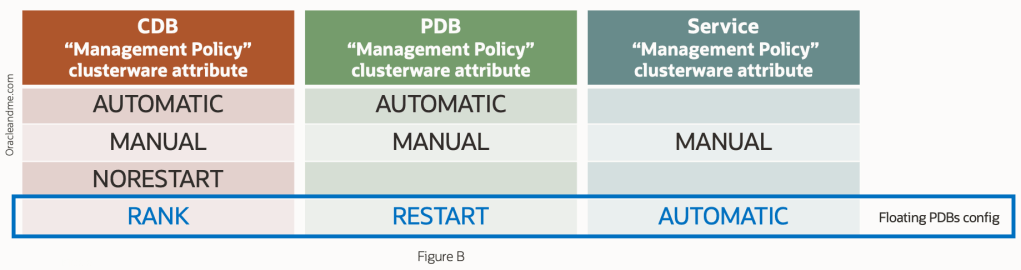
Let’s start implementing it as if it were our first time dealing with it:
[oracle@node1 ~]$ srvctl modify pdb -d CDB21c_fra1cx -pdb DBSALES -cardinality 2
PRCZ-4034 : failed to modify the cardinality of the pluggable database DBSALES
Lesson one: the PDB cardinality must be specified at the creation of the clusterware resource. And once the resource is created, this cardinality attribute cannot be removed. So we proceed to remove the resource from the PDB and recreate it with cardinality (we will not remove the PDB itself – we use the force option to just remove the resource while keeping the pdb open):
[oracle@node1 ~]$ srvctl remove pdb -d CDB21c_fra1cx -pdb DBSALES -f

[oracle@node1 ~]$ srvctl add pdb -d CDB21c_fra1cx -pdb DBSALES -cardinality 2 -policy RESTART
PRCZ-4051 : management policy for database CDB21c_fra1cx is not RANK which is not compatible with RESTART management policy for the pluggable database DBSALES
Lesson two: The clusterware confirms that the CDB database clusterware resource must have a management policy of type “RANK”. Also, the documentation indicates: the CDB instance will not be started automatically unless there is a PDB with a RANK attribute defined that needs it. But before proceeding to change the management policy of the database resource to RANK, let’s make a couple of comments about this configuration…
Setting “RANK” as management policy for the “database” crs resource
The “RANK” mode of the “database” resource management policy indicates that the CDB will not start on the node if there is no PDB that – by the RANK of that PDB – requires that instance to be opened. Therefore, the “floating PDBs” configuration does not really require the CDB to always have database instances running on all nodes in the RAC. When the clusterware is restarted, it will only start a CDB instance if there are any PDBs that need it because of their rank and resource needs (and the circumstantial distribution of the rest of the PDBs in the RAC).
But there is more; the specific RANK number defined for a PDB is applicable clusterware-wide, and not only to its CDB. That is, it establishes the priority of a PDB with respect to the rest of the PDBs of any CDB in the same clusterware. Therefore this new method of “policy-managed” databases not only manages to distribute the PDBs throughout the RAC but also maintains the ability – which the old policy-managed databases had – to not start a instance database if the current distribution does not require it. In other words, a full configuration of “Floating PDBs” not only distributes the PDBs across the RAC nodes but also the actual starting of the database instances on the RAC nodes.
On the other hand, we must not forget that this distribution method works with CPU, so we must always make a configuration of CDBs in terms of memory (SGA+PGA) that is realistic and that allows to have the CDBs open – the database instances – concurrently when needed in each node. Ideally, we would have a single CDB and all PDBs in the same container, and enjoy hot rebalancing of memory when needed (and all the other advantages of multitenant consolidation). But sometimes we will need several CDBs, and in that case, we have to make sure that there is memory in the each node for all (in this floating PDB configuration).
[oracle@node1 ~]$ srvctl modify database -d CDB21c_fra1cx -policy RANKIf you receive an error while altering the “policy” attribute for the database resource, mind if you have an remaining PDB resource without the “cardinality” attribute. Once a PDB is created without the cardinality attribute, then no PDB can be created with cardinality attribute. And viceversa. In that case you may need to remove the other PDB crs resources and redefine them after implementing this step.
[oracle@node1 trace]$ srvctl add pdb -d CDB21c_fra1cx -pdb DBSALES -cardinality 2 -policy RESTART

[oracle@node1 ~]$ srvctl config pdb -d CDB21c_fra1cx
Pluggable database name: DBSALES
Application Root PDB:
Cardinality: 2
Maximum CPU count (whole CPUs): 0
Minimum CPU count unit (1/100 CPU count): 0
Management policy: RESTART
Rank value: 0
Start Option: open
Stop Option: immediate
Good so far. Let’s create the other two PDBs and create their clusterware resources:
[...]
SQL> create pluggable database DBERP from DBSALES keystore identified by We1c0m3_We1c0m3_;
SQL> create pluggable database DBREPORT from DBSALES keystore identified by We1c0m3_We1c0m3_;
[...]
[oracle@node1 ~]$ srvctl add pdb -d CDB21c_fra1cx -pdb DBERP -cardinality 1 -policy RESTART
[oracle@node1 ~]$ srvctl add pdb -d CDB21c_fra1cx -pdb DBREPORT -cardinality 1 -policy RESTART

[oracle@node1 ~]$ srvctl config pdb -d CDB21c_fra1cx
Pluggable database name: DBSALES
Application Root PDB:
Cardinality: 2
Maximum CPU count (whole CPUs): 0
Minimum CPU count unit (1/100 CPU count): 0
Management policy: RESTART
Rank value: 0
Start Option: open
Stop Option: immediate
Pluggable database name: DBERP
Application Root PDB:
Cardinality: 1
Maximum CPU count (whole CPUs): 0
Minimum CPU count unit (1/100 CPU count): 0
Management policy: RESTART
Rank value: 0
Start Option: open
Stop Option: immediate
Pluggable database name: DBREPORT
Application Root PDB:
Cardinality: 1
Maximum CPU count (whole CPUs): 0
Minimum CPU count unit (1/100 CPU count): 0
Management policy: RESTART
Rank value: 0
Start Option: open
Stop Option: immediate
Perfect, we now have our three PDB resources, with their cardinality set. Before continuing with the rest of the pending definitions (cpu and rank), I want to remind you that, from the moment we have created the first clusterware resource of type “PDB” with “-cardinality”, the rest of the resources of type “PDB” of that cluster must also have a “-cardinality” defined. Otherwise, you will get the following message:
[...]
SQL> create pluggable database test admin user test identified by test;
[...]
[oracle@node1 ~]$ srvctl add pdb -d CDB21c_fra1cx -pdb test
PRCZ-4035 : failed to create pluggable database test for database CDB21c_fra1cx without '-cardinality' option
The point is: we must choose a single database deployment strategy for the entire cluster.
Defining PDB resource CPU attibutes
Now that we have defined the cardinality of each one, let’s proceed to give them their CPU attributes. And you may ask: Why didn’t you define the “cardinality”, “mincpuunit” and “maxcpu” attributes in the same command? Wouldn’t it have been easier? And…yes, it would have been easier, but as indicated in the documentation , to define these parameters we need to be logged-in as the owner of the Grid Infrastructure (usually “grid”) or as root. And this applies to both 21c and 23c. So let’s get to it:
[...]
[root@node1 ~]# export ORACLE_HOME=/u01/app/oracle/product/testrel/dbhome_1
[root@node1 ~]# /u01/app/oracle/product/testrel/dbhome_1/bin/srvctl modify pdb -d CDB21c_fra1cx -pdb DBSALES -cardinality 2 -mincpuunit 400 -maxcpu 8
[root@node1 ~]# /u01/app/oracle/product/testrel/dbhome_1/bin/srvctl modify pdb -d CDB21c_fra1cx -pdb DBERP -cardinality 1 -mincpuunit 400 -maxcpu 8
[root@node1 ~]# /u01/app/oracle/product/testrel/dbhome_1/bin/srvctl modify pdb -d CDB21c_fra1cx -pdb DBREPORT -cardinality 1 -mincpuunit 400 -maxcpu 8
[...]
Now that we have the definition of the PDBs’ resources, pending the rank attribute, we can define their services. As we have created the resources of the PDBs with cardinality, then we know that we must also create their services with cardinality. Following the previous Figure A, we define the management policy of the services to “automatic”:
[oracle@node1 ~]$ srvctl add service -d CDB21c_fra1cx -pdb DBSALES -s DBSALESuniform -cardinality UNIFORM -policy AUTOMATIC
[oracle@node1 ~]$ srvctl add service -d CDB21c_fra1cx -pdb DBERP -s DBERPsingle -cardinality SINGLETON -policy AUTOMATIC
[oracle@node1 ~]$ srvctl add service -d CDB21c_fra1cx -pdb DBREPORT -s DBREPORTsingle -cardinality SINGLETON -policy AUTOMATIC

[oracle@node1 ~]$ srvctl config service -d CDB21c_fra1cx | egrep 'Service name|Cardinality|Management policy'
Service name: DBSALESuniform
Cardinality: UNIFORM
Management policy: AUTOMATIC
Service name: DBERPsingle
Cardinality: SINGLETON
Management policy: AUTOMATIC
Service name: DBREPORTsingle
Cardinality: SINGLETON
Management policy: AUTOMATIC
Also, from the tests I have done, the floating PDBs configuration does not get along well with the definition of the “failback yes” service attribute, perhaps because due to the very nature of the configuration, the location of the PDBs is adjusted to the status quo of the resources at any given moment, and not to a “correct initial location” to return to.
Let’s restart the cluster to test the full configuration and see how the PDBs and services are distributed:
[...]
[root@node1 ~]# /u01/app/testrel/grid/bin/crsctl stop cluster -all
[root@node1 ~]# /u01/app/testrel/grid/bin/crsctl start cluster -all
[...]

[oracle@node1 ~]$ srvctl status service -d CDB21c_fra1cx
Service DBSALESuniform is running on instance(s) CDB21c1,CDB21c2
Service DBERPsingle is running on instance(s) CDB21c2
Service DBREPORTsingle is running on instance(s) CDB21c1
The situation is in line with the scenario we wanted, without having specified either the PDBs or the services on which specific nodes they should run. Perhaps we could have found the DBERPsingle service on node 1, and the DBREPORTsingle service on node 2; but the distribution would be equivalent. We will also confirm the PDBs location:
[oracle@node1 ~]$ srvctl status pdb -d CDB21c_fra1cx
Pluggable database DBSALES is enabled.
Pluggable database DBSALES of database CDB21c_fra1cx is running on nodes: node1,node2
Pluggable database DBERP is enabled.
Pluggable database DBERP of database CDB21c_fra1cx is running on nodes: node2
Pluggable database DBREPORT is enabled.
Pluggable database DBREPORT of database CDB21c_fra1cx is running on nodes: node1
Just for your information: In addition to the fact that PDBs are now clusterware resources, they have dependencies with the “services” resources, so if for any reason we start a service and the PDB is not open, it will pull-up. Therefore, if we had made a bad initial cpu allocation, if we try to start a PDB or one of its services (pulling-up the PDB) in a node without enough free CPU resources in it, we would see the following message:
oracle@node1 ~]$ srvctl start service -d CDB21c_fra1cx
[...]
CRS-2527: Unable to start 'ora.CDB21c_fra1cx.DBSALESuniform.svc' because it has a 'hard' dependency on 'ora.CDB21c_fra1cx.DBSALES.pdb'
CRS-33668: unable to start resource 'ora.CDB21c_fra1cx.DBSALES.pdb' on server 'node2' because the server does not have required '800' amount of CPU available '0'
The above configuration is simple and has worked well. But what happens if one of the two nodes goes down?. We had made a distribution of all the CPU resources available. But when one RAC node goes down, it is clear that there will be a temporary loss of compute capacity. Since there are no resources to satisfy the minimum required by the PDBs, we can expect that some of the PDBs will not start (or not in all the nodes), and since we have not defined a “RANK” for each PDB, we would not be deciding the survivors.
Defining PDB resource “RANK” attibute
To solve those situations where there are not enough resources, we use the PDB “RANK” attribute. Values from 0 to 5. The higher the value, the higher the importance. In a cluster start-up or failover situation, the clusterware will always start the PDBs of higher value, consuming the minimum resources required. If when it is the turn of the lowest value PDB, there is no more free CPU on that node, then the PDB is not started.
A similar situation would occur when a node crashes. If the PDBs that failover to a surviving node have a higher RANK than the PDBs that were on that node, and there are no resources for all of them, then the lower RANK PDBs stop and give up resources to the higher RANK PDBs.
We will understand this better as we go through the exercise. First we are going to add RANK attribute definitions to the 3 PDBs, as follows (we do not modify their services):
[...]
[root@node1 ~]# export ORACLE_HOME=/u01/app/oracle/product/testrel/dbhome_1
[root@node1 ~]# /u01/app/oracle/product/testrel/dbhome_1/bin/srvctl modify pdb -d CDB21c_fra1cx -pdb DBSALES -cardinality 2 -mincpuunit 400 -maxcpu 8 -rank 3
[root@node1 ~]# /u01/app/oracle/product/testrel/dbhome_1/bin/srvctl modify pdb -d CDB21c_fra1cx -pdb DBERP -cardinality 1 -mincpuunit 400 -maxcpu 8 -rank 2
[root@node1 ~]# /u01/app/oracle/product/testrel/dbhome_1/bin/srvctl modify pdb -d CDB21c_fra1cx -pdb DBREPORT -cardinality 1 -mincpuunit 400 -maxcpu 8 -rank 1
[...]
Next, let’s crash node #1, and see what happens to the PDBs:
[root@node1 ~]$ rebootWe move on to the second node to see the result of this action:
[oracle@node2 ~]$ srvctl status service -d CDB21c_fra1cx
Service DBSALESuniform is running on instance(s) CDB21c2
Service DBERPsingle is running on instance(s) CDB21c2
Service DBREPORTsingle is not running.

[oracle@node2 ~]$ srvctl status PDB -d CDB21c_fra1cx
Pluggable database DBSALES is enabled.
Pluggable database DBSALES of database CDB21c_fra1cx is running on nodes: node2
Pluggable database DBERP is enabled.
Pluggable database DBERP of database CDB21c_fra1cx is running on nodes: node2
Pluggable database DBREPORT is enabled.
Pluggable database DBREPORT of database CDB21c_fra1cx is not running.
Again it has honoured the configuration we had defined. DBSALES is up because it has the highest RANK (3) and has been assigned its 4 vCPUs. DBERP with RANK 2 is up and has been assigned its 4 vCPUs, leaving the node with no free vCPUs. Therefore DBREPORT has not been started, as it has the lowest RANK and there are no 4 free vCPUs in the system for it.
Well, what would we expect next?. We have in mind that after killing node 1 – and since we have clusterware – it should automatically reboot the database. But only if there is one PDB needing this database instance as it has a “RANK” management policy. So we will wait a few minutes for the clusterware on node 1 to start, and check the status of the PDBs and their services:
[oracle@node2 ~]$ srvctl status service -d CDB21c_fra1cx
Service DBSALESuniform is running on instance(s) CDB21c2
Service DBERPsingle is running on instance(s) CDB21c2
Service DBREPORTsingle is running on instance(s) CDB21c1

[oracle@node2 ~]$ srvctl status PDB -d CDB21c_fra1cx
Pluggable database DBSALES is enabled.
Pluggable database DBSALES of database CDB21c_fra1cx is running on nodes: node1,node2
Pluggable database DBERP is enabled.
Pluggable database DBERP of database CDB21c_fra1cx is running on nodes: node2
Pluggable database DBREPORT is enabled.
Pluggable database DBREPORT of database CDB21c_fra1cx is running on nodes: node1
Great! My Floating PDBs configuration works both in the case of node downtime and in the case of node recovery. Before moving on to the final conclusion, I show you the final configuration of each of the resources:
[oracle@node2 ~]$ srvctl config database -d CDB21c_fra1cx
Database unique name: CDB21c_fra1cx
Database name: CDB21c
Oracle home: /u01/app/oracle/product/testrel/dbhome_1
Oracle user: oracle
Spfile: +DATA/CDB21C_FRA1CX/PARAMETERFILE/spfile.269.1135958631
Password file: +DATA/CDB21C_FRA1CX/PASSWORD/pwdcdb21c_fra1cx.259.1135958235
Domain: tfexsubdbsys.tfexvcndbsys.oraclevcn.com
Start options: open
Stop options: immediate
Database role: PRIMARY
Management policy: RANK
Server pools:
Disk Groups: RECO,DATA
Mount point paths:
Services: DBSALESuniform,DBERPsingle,DBREPORTsingle
Type: RAC
Start concurrency:
Stop concurrency:
OSDBA group: dba
OSOPER group: dbaoper
Database instances: CDB21c1,CDB21c2
Configured nodes: node1,node2
CSS critical: no
CPU count: 0
Memory target: 0
Maximum memory: 0
Default network number for database services:
Database is administrator managed


[oracle@node2 ~]$ srvctl config PDB -d CDB21c_fra1cx
Pluggable database name: DBSALES
Application Root PDB:
Cardinality: 2
Maximum CPU count (whole CPUs): 8
Minimum CPU count unit (1/100 CPU count): 400
Management policy: RESTART
Rank value: 3
Start Option: open
Stop Option: immediate
Pluggable database name: DBERP
Application Root PDB:
Cardinality: 1
Maximum CPU count (whole CPUs): 8
Minimum CPU count unit (1/100 CPU count): 400
Management policy: RESTART
Rank value: 2
Start Option: open
Stop Option: immediate
Pluggable database name: DBREPORT
Application Root PDB:
Cardinality: 1
Maximum CPU count (whole CPUs): 8
Minimum CPU count unit (1/100 CPU count): 400
Management policy: RESTART
Rank value: 1
Start Option: open
Stop Option: immediate


[oracle@node2 ~]$ srvctl config service -d CDB21c_fra1cx
Service name: DBSALESuniform
Server pool:
Cardinality: UNIFORM
Service role: PRIMARY
Management policy: AUTOMATIC
DTP transaction: false
AQ HA notifications: false
Global: false
Commit Outcome: false
Reset State: NONE
Failover type:
Failover method:
Failover retries:
Failover delay:
Failover restore: NONE
Connection Load Balancing Goal: LONG
Runtime Load Balancing Goal: NONE
TAF policy specification: NONE
Edition:
Pluggable database name: DBSALES
Hub service:
Maximum lag time: ANY
SQL Translation Profile:
Retention: 86400 seconds
Failback :  no
Replay Initiation Time: 300 seconds
Drain timeout:
Stop option:
Session State Consistency: DYNAMIC
GSM Flags: 0
Service is enabled
CSS critical: no
Service uses Java: false

Service name: DBERPsingle
Server pool:
Cardinality: SINGLETON
Service role: PRIMARY
Management policy: AUTOMATIC
DTP transaction: false
AQ HA notifications: false
Global: false
Commit Outcome: false
Reset State: NONE
Failover type:
Failover method:
Failover retries:
Failover delay:
Failover restore: NONE
Connection Load Balancing Goal: LONG
Runtime Load Balancing Goal: NONE
TAF policy specification: NONE
Edition:
Pluggable database name: DBERP
Hub service:
Maximum lag time: ANY
SQL Translation Profile:
Retention: 86400 seconds
Failback :  no
Replay Initiation Time: 300 seconds
Drain timeout:
Stop option:
Session State Consistency: DYNAMIC
GSM Flags: 0
Service is enabled
CSS critical: no
Service uses Java: false

Service name: DBREPORTsingle
Server pool:
Cardinality: SINGLETON
Service role: PRIMARY
Management policy: AUTOMATIC
DTP transaction: false
AQ HA notifications: false
Global: false
Commit Outcome: false
Reset State: NONE
Failover type:
Failover method:
Failover retries:
Failover delay:
Failover restore: NONE
Connection Load Balancing Goal: LONG
Runtime Load Balancing Goal: NONE
TAF policy specification: NONE
Edition:
Pluggable database name: DBREPORT
Hub service:
Maximum lag time: ANY
SQL Translation Profile:
Retention: 86400 seconds
Failback :  no
Replay Initiation Time: 300 seconds
Drain timeout:
Stop option:
Session State Consistency: DYNAMIC
GSM Flags: 0
Service is enabled
CSS critical: no
Service uses Java: false
Final Thoughts
Perhaps it has been too long an article for an implementation of just a few commands, but we have learned once again that it is important to know a feature well before starting to work with it. Having clear the final configuration we want, we can just create the resources from the beginning, in an orderly manner, setting all the necessary attributes to work in “Floating PDBs” mode and testing the configuration as a whole.
Today I’d also want to remind you of my favourite premise: this configuration is no better than any other configuration. It is better if it suits you better. The most important thing is that you know its requirements and capabilities when making a choice. I would personally consider this architecture for systems where a large number of PDBs have been consolidated, and where a manual management of the services can be a real nightmare – especially if we work with asymmetric located services. If, on the other hand, I feel comfortable managing the services with that level of granularity, I would probably follow an “admin managed” approach.
Finally, remember that this is a feature introduced in 21c and ported almost identically to 23c. We can say that it is reasonably new. What does this mean in Oracle terms? Test, test, test. Try to always work with the latest 23c release available and perform all the appropriate failover/failback tests to validate the configuration and familiarise yourself with the setup.
See you in the next one!
 Oracle and Me