
Oracle has taken a giant step forward with the introduction of the container architecture (aka multitenant). The core set of operations with PDBs is now well known to DBAs, who are beginning to see operations such as a “PDB hot clone” or “Refreshable PDBs” as part of their routine.
But beyond that core set of operations, there are others that are less well known and probably less used. One such operation is the “Snapshot Carousel” (SC). This will be the subject of todays article. And you will see few commands. Not needed today.
SC is one of three new operations introduced in 18c, along with “Refreshable PDB switchover” and “CDB fleet”. In addition, there is the interesting situation that all three operations are only available in engineering systems (E.G.- Exadata) and/or Oracle Cloud systems.
Remember: No PDB operation requires additional licensing. The only circumstance that requires a multitenant license onpremises is having more than 3 user PDBs per container. But in any case, multitenant is available on all Oracle database versions (including standard edition), and all its operations without exception are included in the database license. This has nothing to do with factoring, which is about the operation availability; there are certain operations that are technically limited to certain platforms like Engineered Systems or Oracle Cloud Infrastructure.
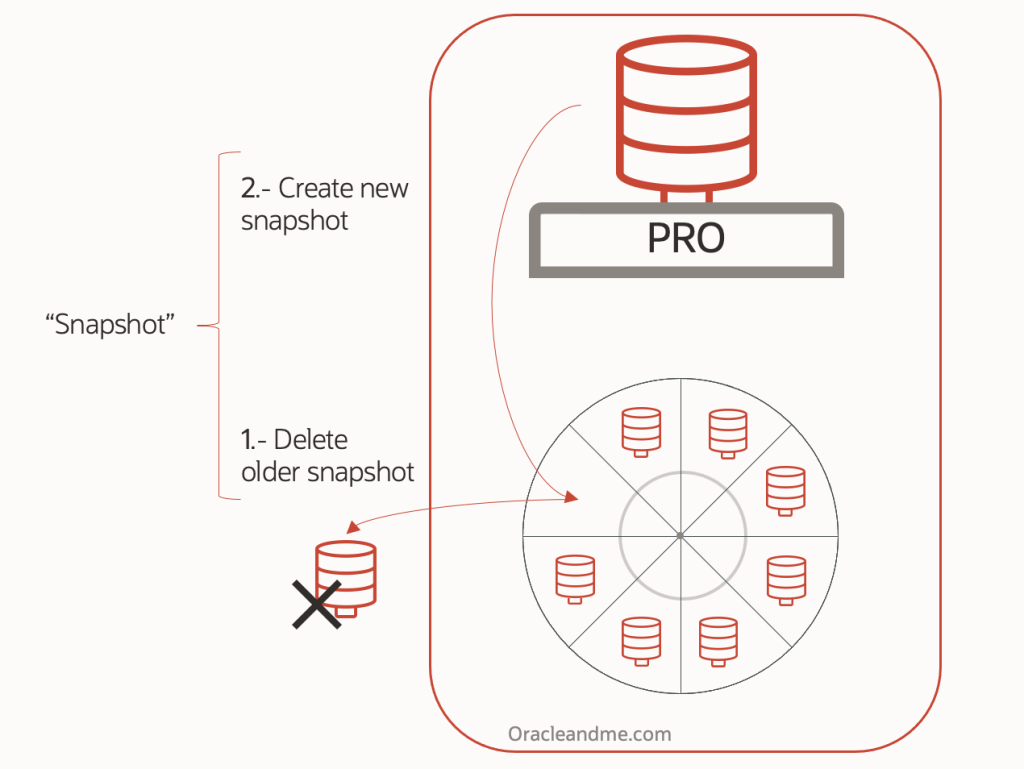
Snapshot Carousel is a very specific PDB configuration, which allows the creation of a repository storing full consistent copies of that PDB. Those copies are named “snapshots” and can be configured on a periodic basis. And It is called Carousel because when a snapshot is created, two consecutive actions are executed:
- Delete the oldest snapshot of the carousel
- Create the new snapshot
These consecutive actions is the reason why it reminds of a carousel, similar to a circular buffer where N copies of the source PDB are retained at a specific past time. It could be represented like this :
Attention : The term “snapshot”, used in the context of an SC configuration, has no similarity whatsoever with the clause “snapshot copy” that we tested in past exercises, which creates “thin” copies. Unfortunately, the same term has been used for both operations, leading to confusion among some DBAs.
The following command is a Snapshot Carousel operation:
SQL> alter pluggable database snapshot ;
While the following command creates a PDBs with thin-provisioning feature:
SQL> create pluggable database PDB1 from PDB2 snapshot copy;
Please keep in mind that they are totally different operations. And as if that were not enough, this confusion is further enhanced because certain configurations – according to the 19c documentation -, uses the “snapshot copy” feature.
So the snapshot carousel feature is very interesting as presented. It provides an architecture that allows to perform the following procedures – among others – using simple SQL commands:
- Restore the PDB to a specific point in time (PITR).
- Use a snapshot to refresh (e.g.) a non-productive environment to a specific snapshot in a specific time. It also allows to use different snapshots to create and maintain open copies of the PBD at different points in time.
Now…
This is when I would show you the diagrams with the two use cases, and then the steps to implement them. But in this case, I propose to take a look to some of the limitations of SC, because as you will see, they largely influence the final solution:
- SC does not allow to create snapshots in ASM. They can be created in a filesystem (Bug 32343717, solved in 21c – no backport possible for 19c).
- The recovery of a snapshot is done in the same CDB as the original PDB.
- SC does not have the capability to use native thin provisioning technology (eg. ACFS or exadata sparse diskgroup). Initially all snapshots are full copies in “.PDB” format (zip containing the manifest file and datafiles).
- SC also does not have the ability to use ACFS filesystem thin-provisioning capability (Bug 32902291).
So… in order to implement the solution displayed in the first picture, we would need to place the PROD database datafiles outside ASM. In that case, I’d personally choose an ACFS filesystem, as it is build on top of ASM. Totally supported in 19c, although it would not be my first choice; I’d like PROD db to be in ASM, as an Oracle Standard, and for other reasons – we will not be reviewing today. Anyhow, we will set those datafiles in ASM for the sake of the example.
We know that ACFS filesystem thin provisioning feature cannot be used by the snapshot carousel, so we also know that all the snapshots will be full database snapshots in “.PDB” format.
Exadata users: Keep in mind that placing your datafiles in ACFS will prevent the database to use the SMART SCAN feature!
Ok, so now I have my PROD db on ACFS and I’m able to use SC. I proceed, and I start creating a manual snapshot, just to test the grounds. Once snapshot is created, I take a look to DBA_PDB_SNAPSHOTS and I see that the snapshot is indeed created as a “.PDB” file. This implies :
- The creation of the “snapshot” will require additional CPU on the same CDB where the source PDB is plugged as it has to compress the datafiles in this zip “.PDB” file.
- It will also require additional time, for the same reason.
This format can be limiting for TB-sized databases where using the XML+datafiles might be more convenient (by all means, keep using .PDB format if your databases are not huge and you are happy with your timings).
Time to implement both use cases
Lets say that I’m happy with the PDB snapshot creation timings; my database is not too big and the snapshots are created swiftly. Now, I’d like to “restore” my PROD database to one of my snapshots; specifically to the tuesday snap:

The first thing it comes to my mind is that I cannot just “consume” /directly open the tuesday snapshot. The moment I perform the following command …
SQL> create pluggable database PDB2 from PDB1 using snapshot TueSnap;… the database will need to copy the -uncompressed- files into the db_create_file_dest (or whatever create_file_dest in the command). In any case, we need to wait until all the PDB snapshot data is copied elsewhere. And it will take equal additional space.
This means that this approach may not be really suitable for instant PDB recovery of big sized DBs. This goal – instant PDB recovery-, could be achieved if the snapshot where created in XML+datafiles format, and the SC would allow to actually create a PDB from those snapshot datafiles inplace – consuming them. In that case, opening the Tuesday DB “snapshot” would be a matter of seconds.
Lets move on and think about the second use case: to leverage the PROD snapshots to recreate nonprod environments with specific point in time PROD snapshots.
We know that snapshots can only be restored in the same CDB as the source PDB, so having the SC in the PROD CDB seems not to be the solution. We would need the SC in a nonprod CDB. We can achieve that with multiple technologies but lets use a very useful PDB feature which is the Refreshable PDB:
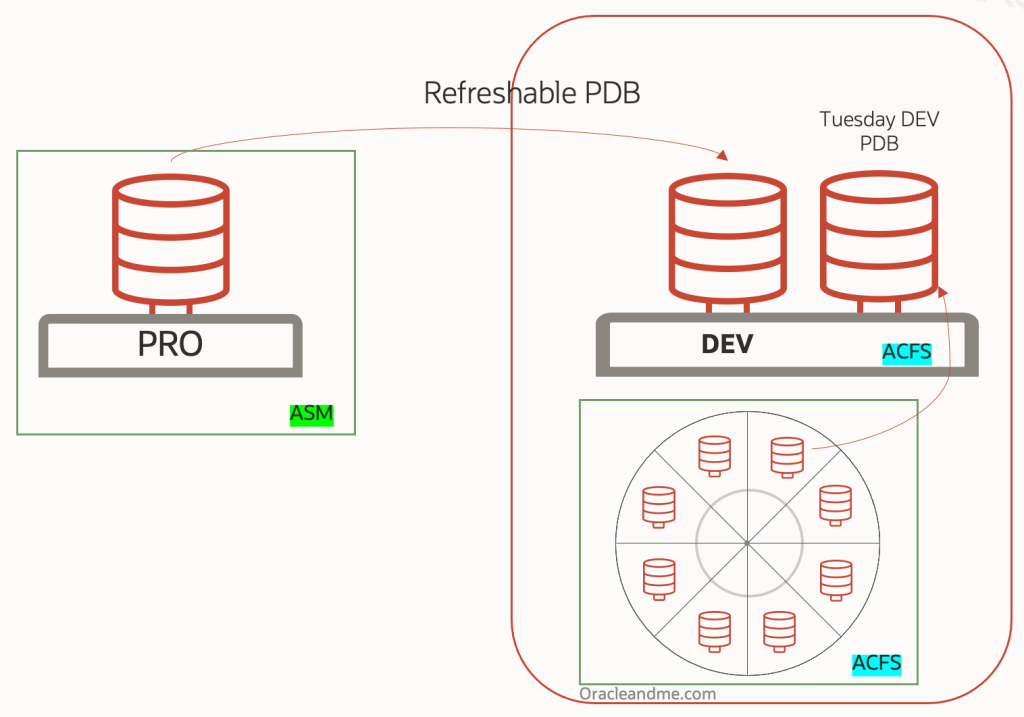
This actually looks more appealing to me. No need to describe it, right?. PRO database is isolated and working with ASM. We have a refreshable PDB as a local reflection of the PRO database, and we build a Snapshot Carousel from it. Each time I need to refresh a nonprod environment, I’ll not only have a local image, but I can even choose the date of that image.
From here, we could – we would implement this ourselves – develop the solution even further, and leverage the ACFS copy-on-write capability to deploy as many nonprod environments without sacrificing too much space:

So far…
We can say that Snapshot Carousel, in 19c release, is still a feature with room for improvement. We even know that some of its limitations have been fixed in 21c, and we will see what happens with 23c soon.
In the meantime, with 19c: can we achieve all of those missing features in Snapshot Carousel, without implementing Snapshot Carousel?. Well, I’m about to invite you to read Chapter 2, so the answer is yes.
See you in the next post!
 Oracle and Me