

In previous chapter 2nd we tested how easy is to implement PDB snapshot copies with a very simple setup. We leveraged this fantastic storage-based technology which is ACFS and it’s copy-on-write clones. In the example we used in that previous post, we had both the refreshable PDBs and the snapshot copies in the same CDB, which is not that common, but was convenient to showcase the features.
You will probably be using the refreshable PDBs and snapshot clones in a different container, as one of the main use cases of these technologies is to refresh the non-production environments. Something like this:
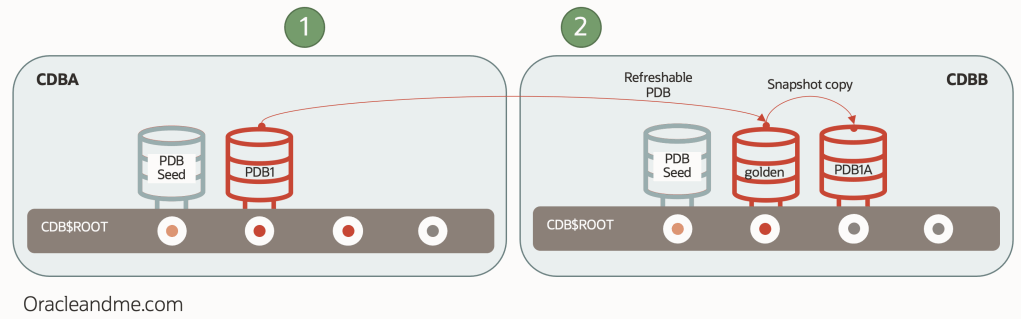
The copy-on-write technology is offered by the storage system and therefore the snapshot copy “PDB1A” was located in the same CDB as the parent PDB; “CDBB”.
But, what if we need to create only the PDB snapshot copy in a different host?. E.g. can we swiftly put a full read-write copy of our production database in multiple small development servers?. Something like this:
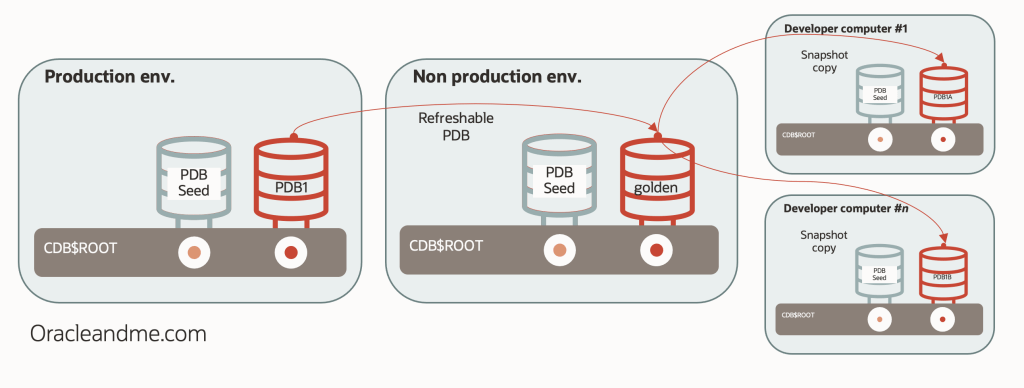
Well, this is the subject of today’s article. But, in order to simplify the testcase, we will just create the refreshable PDB in the same CDB as the source PDB. So this will be our testcase:
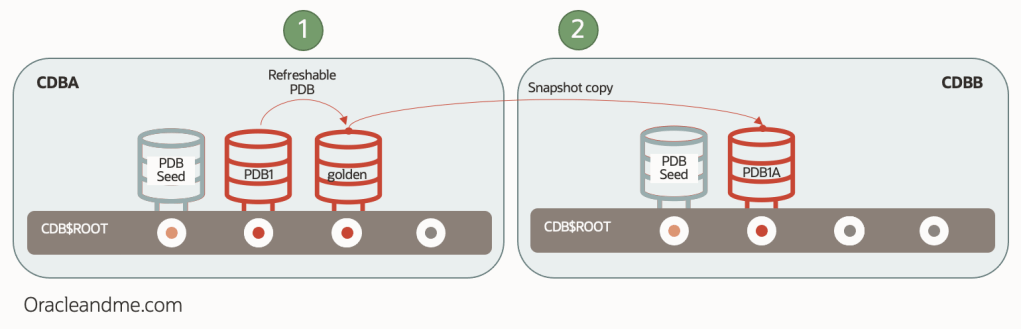
We have a production database “PDB1” and a refreshable PDB “golden” in the “CDBA” container. We will be using this refreshable PDB “golden” as the parent of our remote snapshot copies, so this “1-set” of refreshed datafiles can be used to create multiple snapshot copies along multiple remote servers without needing to duplicate the full set of datafiles in each remote server. Remote servers will only need enough local space to have it’s local temp, undo and space for local changes.
Let’s see what kind of infrastructure we will need :
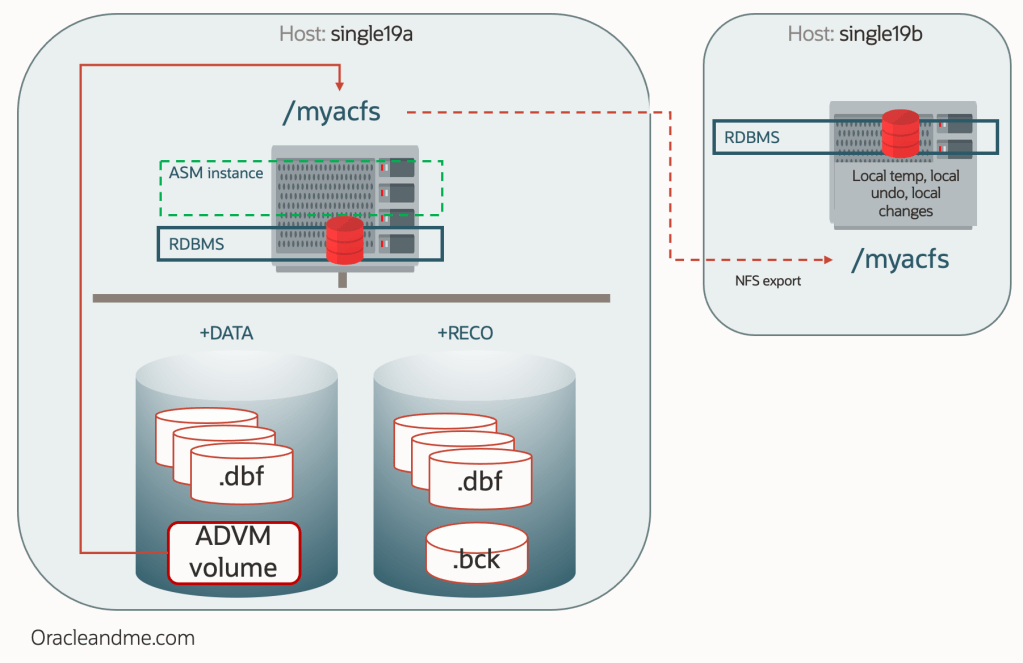
So we basically have the same infrastructure as the “chapter 2” post. But you might be wondering… “wait a minute, you said that today we would be talking about snapshot clones using the filesystem feature, but now you bring ACFS back again?”. Well, yes!. As you noted in “chapter 2”, we actually had to create a filesystem on top of the ADVM volume. So ACFS is a storage system with lots of features and… a filesystem on top of it. This means that – if for some reason – we cannot leverage the storage system features, we could still use the filesystem features. To achieve that, we need an additional technology to present that filesystem in the remote server.
And here is were NFS comes into play; more precisely Oracle dNFS. We will use dNFS to export our ACFS “/myacfs” as a NFS filesystem from “single19a” host to “single19b” host. Which means that Oracle software will be able to remotely access the “golden” datafiles via network, along with any other file created on that filesystem.
Exporting “/myacfs” with dNFS
Main tasks to be done on source server “single19a” (double check that firewall and iptables rules are properly configured. Also check with your system admin the proper nfs options according to the company security criteria):
[root@single19a ~]# whoami
root
[root@single19a ~]# vi /etc/exports
/myacfs *(rw,sync,no_root_squash,insecure,anonuid=101,anongid=1001)
[root@single19a ~]# systemctl enable nfs.service
[root@single19a ~]# systemctl start nfs.service
[root@single19a ~]# exportfs -v
/myacfs (sync,wdelay,hide,no_subtree_check,anonuid=101,anongid=1001,sec=sys,rw,secure,root_squash,all_squash)
Main tasks for both servers (showing steps for “single19b”):
[root@single19b ]$ whoami
root
[root@single19b ]$ ls -ld /nfsmountpoint
drwxr-xr-x 6 oracle oinstall 32768 Jan 11 13:56 /nfsmountpoint
[root@single19b ]$ vi /etc/fstab
130.61.35.10:/myacfs /nfsmountpoint nfs rw,bg,hard,nointr,rsize=32768,wsize=32768,tcp,actimeo=0,vers=3,timeo=600 0 0
[root@single19b ]$ mount /nfsmountpoint
[root@single19b ]$ mount | grep -i nfsmountpoint
130.61.35.10:/myacfs on /nfsmountpoint type nfs (rw,relatime,vers=3,rsize=32768,wsize=32768[…]addr=130.61.35.10)
[root@single19b ]# df -k /nfsmountpoint
Filesystem 1K-blocks Used Available Use% Mounted on
130.61.35.10:/myacfs 52428800 6441856 45986944 13% /nfsmountpoint
Remember that dNFS configuration is made on top of the NFS config. So now that NFS is configured and mount point mounted, we can proceed and configure dNFS:
[root@single19b ]# vi $ORACLE_HOME/dbs/oranfstab
server: single19a
local: 10.1.20.51 #local interface or ip to send dnfs traffic
path: 130.61.35.10 #nfs server ip
export: /myacfs mount: /nfsmountpoint
[oracle@single19b ~]$ cd $ORACLE_HOME/rdbms/lib
[oracle@single19b lib]$ make -f ins_rdbms.mk dnfs_on
rm -f /u01/app/oracle/product/19.0.0.0/dbhome_1/rdbms/lib/odm/libnfsodm19.so; \
cp /u01/app/oracle/product/19.0.0.0/dbhome_1/lib/libnfsodm19.so /u01/app/oracle/product/19.0.0.0/dbhome_1/rdbms/lib/odm/libnfsodm19.so
Finally, we will restart the database so the configuration takes effect, and verify that we are indeed leveraging dNFS and not only the standard NFS protocol:
SQL> !hostname
single19b
SQL> show parameters db_name
NAME TYPE VALUE
db_name string CDBB
SQL> select svrname, dirname, mntport, nfsport, wtmax, rtmax from v$dnfs_servers;
SVRNAME DIRNAME MNTPORT NFSPORT WTMAX RTMAX
single19a /myacfs 20048 2049 0 0
Creating the local refreshable PDB
We will be using the CDB self-reference dblink created in the previous post and store the refreshable PDB datafiles in the same NFS filesystem we will be exporting to the second server (this is the reason why we have mounted the NFS mountpoint in both servers):
SQL> !hostname
single19a
SQL> show parameters db_name
NAME TYPE VALUE
db_name string CDBA
SQL> show pdbs
CON_ID CON_NAME OPEN MODE RESTRICTED
2 PDB$SEED READ ONLY NO
3 PDB1 READ WRITE NO
4 GOLDEN MOUNTED
SQL> create pluggable database golden from PDB1@clonelink create_file_dest=’/nfsmountpoint’ refresh mode manual;
Pluggable database created.
SQL> alter pluggable database golden open read only;
SQL> show pdbs
CON_ID CON_NAME OPEN MODE RESTRICTED
2 PDB$SEED READ ONLY NO
3 PDB1 READ WRITE NO
4 GOLDEN READ ONLY NO
SQL> select guid from v$pdbs where con_id=4;
GUID
F1F9DD7D86A97021E053BA14010AC06F
SQL> !ls -ld /myacfs/CDBA*/F1F9DD7D86A97021E053BA14010AC06F
drwxr-x— 3 oracle asmadmin 20480 Jan 11 09:39 /myacfs/CDBA_FRA1Z6/F1F9DD7D86A97021E053BA14010AC06F
Remote PDB snapshot copy creation
Provided that we have already created the necessary dblink from CDBB to CDBA, lets see what happens if we trigger the remote snapshot copy PDB creation at the remote server:
SQL> !hostname
single19b
SQL> create pluggable database PDB1A from golden@linkgolden create_file_dest=’/nfsmountpoint’ SNAPSHOT COPY;
*
ERROR at line 1:
ORA-65169: error encountered while attempting to copy file
ORA-17525: Database clone using storage snapshot not supported on file
Maybe…
SQL> show parameters clone
NAME TYPE VALUE
clonedb boolean FALSE
Remember what we explained about needing to explictly define the “clonedb” parameter to “TRUE” only in case we will be needing to use the filesystem feature instead of the storage system feature?. This is it. As in this server there is no ACFS, we cannot use the ACFS thin provisioning feature. We need the NFS thin provisioning feature:
[oracle@single19b lib]$ sqlplus / as sysdba
SQL> alter system set clonedb=TRUE scope=spfile;
System altered.
SQL> exit
[oracle@single19b ]$ srvctl stop database -d CDBB_fra1pw -o immediate
[oracle@single19b ]$ srvctl start database -d CDBB_fra1pw
[oracle@single19b ]$ sqlplus / as sysdba
SQL> create pluggable database PDB1A from GOLDEN@linkgolden create_file_dest=’/nfsmountpoint’ SNAPSHOT COPY;
Pluggable database created.
Now we have our snapshot copy database opened read-write in our remote server.
SQL> alter session set container=pdb1a;
Session altered.
SQL> select file_name from dba_data_files order by 1
FILE_NAME
/nfsmountpoint/CDBB_FRA1PW/F20213EFD0B23D4CE0533314010AB0C4/datafile/o1_mf_sysaux_kvxzlld9_.dbf
/nfsmountpoint/CDBB_FRA1PW/F20213EFD0B23D4CE0533314010AB0C4/datafile/o1_mf_system_kvxzllcb_.dbf
/nfsmountpoint/CDBB_FRA1PW/F20213EFD0B23D4CE0533314010AB0C4/datafile/o1_mf_undotbs1_kvxzlldy_.dbf
/nfsmountpoint/CDBB_FRA1PW/F20213EFD0B23D4CE0533314010AB0C4/datafile/o1_mf_users_kvxzllgw_.dbf
Final thoughts
In today’s article we have seen an example of snapshot copy using filesystem technology. NFS is one of those filesystems with this thin-provisioning feature, which has allowed us to do something as unusual as presenting a “snapshot clone” on a remote machine. Again, this is an unusual configuration with obvious performance limitations, but it is a cool example which helps us to better understand the technology.
Although, on second thought, It would be a very interesting practice to look for strategies to make these NFS snapshot copies run faster. Oracle’s caching capabilities should not be underestimated. There are some really powerful technologies that we could put in place to improve these remote snapshot copies PDBs like leveraging the buffer cache with some preloads in the keep pool, using the result cache, trying the 19c memoptimize fast read, using In-Memory database, using the big table caching, etc etc. Maybe subject for a future post.
Snapshot copies still have a large number of possible architectures. Do you have an active dataguard physical standby available?. Would you like to use it as a source for snapshot clones?. Check out the next post!.
 Oracle and Me