

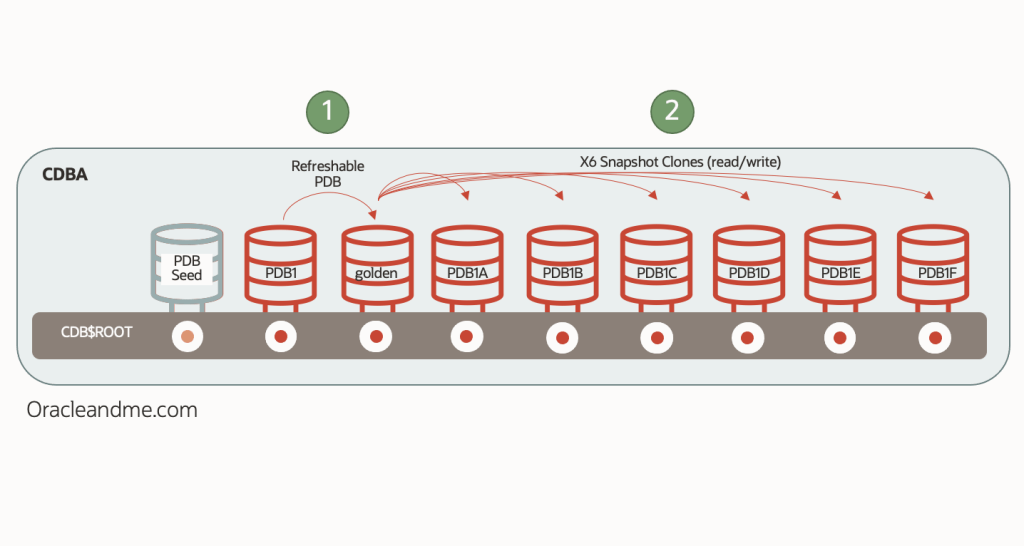
Today we will focus on a simple practical exercise where we are going to demonstrate how easy it is to create snapshot copies with a minimal infrastructure. We start from a 19c EE single instance database and ASM storage. This database consists of the CDB “CDBA” and the PDB “PDB1”, running on a virtual machine. The practice will consist of creating a refreshable PDB from it, and six snapshot copies built on top of the refreshable PDB:
Preliminary configurations
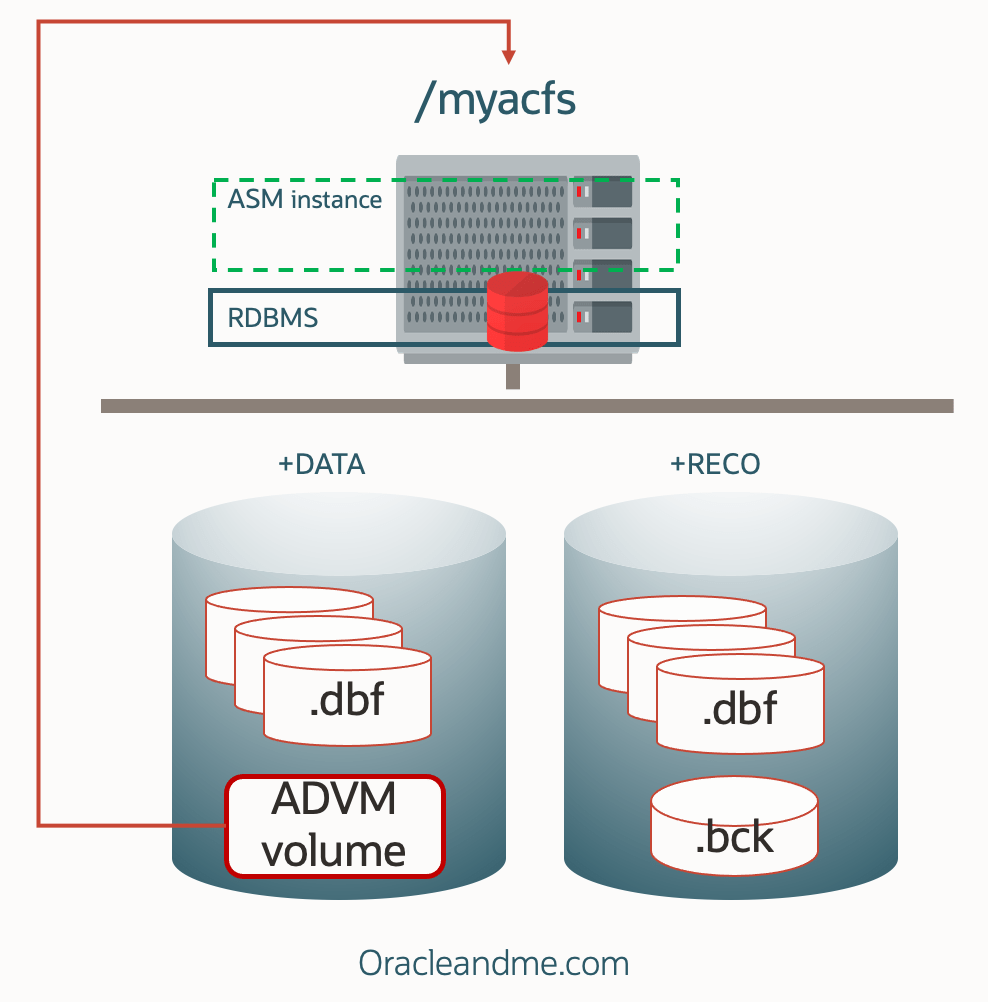
We will rely on ACFS for the creation of the snapshot copies, and therefore the first thing we must do is to configure this storage. The steps to perform the configuration, in brief, are as follows:
- Create a Volume within the ASM diskgroup of your choice. In this case we have chosen “+DATA”.
- Create a filesystem inside that volume.
- Register the filesystem in the clusterware (Grid Infrastructure) so that it mounts it automatically and can have its dependencies with other resources.
- Start the filesystem manually (on subsequent reboots it will be mounted automatically).
- Define the Unix permissions that we want for the filesystem.
(Please note: the way the following exercises are done is oriented to facilitate the understanding and clarity of the exercise; there are more efficient ways to perform the execution of the commands such as the use of “sudo”, but this is not the purpose of this article. I have also removed any command and output that does not help to understand the point of the example.)
1st Step: Volume creation
[grid@single19a ~]$ whoami
grid
[grid@single19a ~]$ asmcmd
ASMCMD> volcreate -G data -s 50G myvolume
ASMCMD> volinfo -G data myvolume
Diskgroup Name: DATA
Volume Name: MYVOLUME
Volume Device: /dev/asm/myvolume-455
State: ENABLED
Size (MB): 51200
Resize Unit (MB): 64
Redundancy: UNPROT
Stripe Columns: 8
Stripe Width (K): 1024
Usage:
Mountpath:
ASMCMD> exit
2nd Step: Filesystem creation
[grid@single19a ~]$ /sbin/mkfs -t acfs /dev/asm/myvolume-455
mkfs.acfs: version = 19.0.0.0.0
mkfs.acfs: on-disk version = 46.0
mkfs.acfs: volume = /dev/asm/myvolume-455
mkfs.acfs: volume size = 53687091200 ( 50.00 GB )
mkfs.acfs: Format complete
3rd Step: Filesystem registration
[root@single19a ~]# whoami
root
[root@single19a ~]# /u01/app/19.0.0.0/grid/bin/srvctl add filesystem -device /dev/asm/myvolume-455 -path /myacfs -user oracle
4nd Step: Filesystem manual start
[grid@single19a ~]$ whoami
grid
[grid@single19a ~]$ srvctl start filesystem -device /dev/asm/myvolume-455
5th Step: Ownership definition
[root@single19a ~]# whoami
root
[root@single19a ~]# chown -R oracle:dba /myacfs
Status:
[oracle@single19a ~]$ df -k /myacfs
Filesystem 1K-blocks Used Available Use% Mounted on
/dev/asm/myvolume-455 52428800 420104 52008696 1% /myacfs
[oracle@single19a ~]$ touch /myacfs/mytest
[oracle@single19a ~]$ ls -lart /myacfs
total 100
drwx—— 2 oracle dba 65536 Jan 2 13:15 lost+found
dr-xr-xr-x. 20 root root 4096 Jan 2 13:16 ..
-rw-r–r– 1 oracle oinstall 0 Jan 2 13:17 mytest
drwxr-xr-x 4 oracle dba 32768 Jan 2 13:17 .
Well, now we have a storage system with thin provisioning capability. This is a one-time configuration, and as you can see, it is trivial. Another configuration that we will have to do only once, needed for creating and refreshing the refreshable PDBs, is the creation of a dblink against the source database. We usually create the Refreshable PDBs in different CDBs, and even in different servers. But in this case we are going to create the Refreshable PDB inside the same CDB to simplify the example (we will leave the creation in a remote CDB for the snapshot copies example using a unix filesystem – future post).
It is important to clarify, before continuing, that when a dblink is used in PDB lifecycle operations (such as remote clones, refreshable PDBs, relocates, etc.), it is used exclusively to locate and access the counterpart CDB. No data is copied through the dblink.
In order to create the dblink – in this case against a PDB in the same CDB – we will need two things: A) a “common” connection user, and B) a tnsnames.ora alias or a connection string to a service of the source PDB.
- Common user for dblink :
SQL> Create user c##clonings identified by Oracl3_and_M3 container=all;
SQL> Grant create session, create pluggable database, sysoper to c##clonings container=all;
- Tnsnames.ora alias for the dblink:
PDB1 =
(DESCRIPTION =
(ADDRESS = (PROTOCOL = TCP)(HOST = single19a)(PORT = 1521))
(CONNECT_DATA =
(SERVER = DEDICATED)
(SERVICE_NAME = myPDB1service.tfexsubdbsys.tfexvcndbsys.oraclevcn.com)
)
)
Dblink creation:
SQL> create database link clonelink connect to c##clonings identified by Oracl3_and_M3 using ‘PDB1’;
SQL> select sysdate from dual@clonelink;
06-JAN-23
Exercise implementation
Now we will move on to create the Refreshable PDB. Since we will want to create snapshot clones from it, we must place it already on the storage system that offers that capability – in this case ACFS* :
SQL> create pluggable database golden from PDB1@clonelink create_file_dest=’/myacfs’ refresh mode manual;
SQL> alter pluggable database golden open read only;
SQL> show pdbs
CON_ID CON_NAME OPEN MODE RESTRICTED
2 PDB$SEED READ ONLY NO
3 PDB1 READ WRITE NO
5 GOLDEN READ ONLY NO
(*We will be using a database without TDE encryption in this exercise. I will cover PDBs and TDE in further posts for sake of simplicity.)
Once we have the Refreshable PDB created, let’s get the occupancy of that filesystem; which currently only hosts the “GOLDEN” Refreshable PDB . This information will be useful later to check how big the snapshot clones are:
SQL> !/sbin/acfsutil info fs /myacfs | egrep -i “size|free”
metadata block size: 4096
total size: 53687091200 ( 50.00 GB )
total free: 52066717696 ( 48.49 GB )
logical sector size: 512
size: 53687091200 ( 50.00 GB )
free: 52066717696 ( 48.49 GB )
ADVM resize increment: 67108864
Now lets create the 6 read-write snapshot clones from the refreshable PDB we have previously opened in read-only :
SQL> Set timing on
SQL> create pluggable database PDB1A from golden create_file_dest=’/myacfs’ snapshot copy ;
Pluggable database created.
Elapsed: 00:00:03.48
SQL> create pluggable database PDB1B from golden create_file_dest=’/myacfs’ snapshot copy;
Pluggable database created.
Elapsed: 00:00:03.51
SQL> create pluggable database PDB1C from golden create_file_dest=’/myacfs’ snapshot copy;
Pluggable database created.
Elapsed: 00:00:03.11
SQL> create pluggable database PDB1D from golden create_file_dest=’/myacfs’ snapshot copy;
Pluggable database created.
Elapsed: 00:00:03.45
SQL> create pluggable database PDB1E from golden create_file_dest=’/myacfs’ snapshot copy;
Pluggable database created.
Elapsed: 00:00:03.93
SQL> create pluggable database PDB1F from golden create_file_dest=’/myacfs’ snapshot copy;
Pluggable database created.
Elapsed: 00:00:03.41
SQL> alter pluggable database all open;
I have created 6 read-write copies of my refreshable PDB in less than a minute; just the time needed to create a local temp and Undo tablespace per database. Notice that we are not using a filesystem feature and so we don’t need to define “clonedb” to TRUE in order to implement this:
SQL> show parameters clonedb
NAME TYPE VALUE
clonedb boolean FALSE
Now lets take a look on the space consumption :
SQL> !/sbin/acfsutil info fs /myacfs | egrep -i “size|free”
metadata block size: 4096
total size: 53687091200 ( 50.00 GB )
total free: 50632454144 ( 47.16 GB )
logical sector size: 512
size: 53687091200 ( 50.00 GB )
free: 50632454144 ( 47.16 GB )
ADVM resize increment: 67108864
48.49 Gb free before the snapshots – 47.16 Gb free after the snapshots = 1,33 Gb spaced used – their own temps+undos basically. But let’s see how the actual snapshots takes per se:
SQL> !/sbin/acfsutil info fs /myacfs | egrep -i snapshot
number of snapshots: 6
snapshot space usage: 51982336 ( 49.57 MB )
49.57 Mb… Now we can understand the reason behind the term “thin provisioning” !.
And finally it comes the moment of truth. Can we refresh the refreshable PDB?. What happens to the dependent snapshot clones we have previously created and are currently opened read-write?.
Well, nothing better than testing. Lets create a new simple reference table on our source “PDB1” database, and proceed to refresh the “GOLDEN” refreshable database while the snapshots copies are still created and opened read-write:
SQL> alter session set container=PDB1;
SQL> create table system.test (i number) tablespace users;
Table created.
SQL> insert into system.test values (1);
1 row created.
SQL> commit;
Commit complete.
SQL> alter session set container=CDB$ROOT;
Session altered.
SQL> show pdbs
CON_ID CON_NAME OPEN MODE RESTRICTED
2 PDB$SEED READ ONLY NO
3 PDB1 READ WRITE NO
4 PDB1B READ WRITE NO
5 PDB1A READ WRITE NO
6 GOLDEN READ ONLY NO
7 PDB1C READ WRITE NO
8 PDB1D READ WRITE NO
9 PDB1E READ WRITE NO
10 PDB1F READ WRITE NO
SQL> alter pluggable database GOLDEN close;
Pluggable database altered.
SQL> alter pluggable database GOLDEN refresh;
Pluggable database altered.
SQL> alter pluggable database GOLDEN open read only;
Pluggable database altered.
We will verify that the refreshable PDB has indeed synced with the changes:
SQL> alter session set container=GOLDEN;
Session altered.
SQL> select * from system.test;
I
1
Now let’s check if we still can access the former snapshot clones, and whether they reflect this new simple change:
SQL> alter session set container=CDB$ROOT;
Session altered.
SQL> alter session set container=PDB1A;
Session altered.
SQL> select * from system.test;
select * from system.test
*
ERROR at line 1:
ORA-00942: table or view does not exist
And this is actually great news. The snapshot copies, which are still opened read-write, have not been affected by the latest refresh of its parent “GOLDEN” database. We have just verified that “copy-on-write” ACFS storage feature, described in my previous post, is totally integrated with multitenant technology.
One final comment: does it makes sense to have a refreshable PDB on your same CDB?. Guess my answer… you decide that. Does it solves your specific case?. For this case, It’s been a nice example to test this technology, but you will probably be creating refreshable PDBs in a remote CDB as a golden master for other enviroments.
Would you like to see how to make a snapshot clone using a Unix filesystem like NFS?. Check out the next article!.
 Oracle and Me