

The CDB (container database) architecture, also called multitenant, is the new standard in Oracle database architecture. So much so, that nonCDB databases are de-supported from versions 21c onwards. This implies that both in its singletenant model (one user PDB per CDB) and in its multitenant model (several user PDBs per CDB), PDB operations are going to become a “must” for any DBA – if it is not already.
Being the new architectural reference, multitenant is a free feature per se, although limited to 3 user PDBs per CDB – the PDB$SEED does not count as it is not a user PDB. In case we want to do a larger consolidation on onpremises, we can purchase the multitenant license. We will talk more about multitenant in OCI later on.
Most of the operations that can be performed with PDBs are available in both Enterprise Edition (EE) and Standard Edition (SE2) at no additional cost. Only 3 multitenant operations are limited (at no additional cost) to Exadata onpremises engineering systems, or to any OCI product: CDB Fleet management, PDB Snapshot carousel and Refreshable PDB Switchover.
By now we are probably all familiar with the basic operations that can be performed with PDBs. I will try to summarize the main ones with the following poster:

But the real strength of multitenant operations is not in the isolated capabilities of each of them, but in the possible combinations with which we use them – synergy.
In today’s post we will not go through each of the operations in detail (we will cover that in future posts), but we will focus on these combinations. We will just display the most relevant sql commands to showcase the scenario.
Let’s take a simple example. Let’s imagine that we need to periodically refresh a development database from the production database. We can perform this operation in the simplest way, by creating a remote clone from the production database:

SQL> create pluggable database PDB1 from PDB1@dblinktoCDB1;
This is a simple approach, although not necessarily efficient for large databases; especially relevant when the information has to travel over a network. Instead, we could use a refreshable PDB, where on each refresh we will be sending only the differential REDO from the previous refresh. This would allow us to launch the refresh process of the environment in advance, to later convert the refreshable PDB into a read/write database – the new development database :

SQL> create pluggable database PDB1 from PDB1@dblinktoCDB1 refresh mode manual;
SQL> alter pluggable database PDB1 open read only; — all ok?
SQL> alter pluggable database PDB1 close immediate; — closing for refresh
SQL> alter pluggable database PDB1 refresh; –we will do N refreshes
— once we are ready to convert it to read-write:
SQL> alter pluggable database PDB1 refresh mode none;
SQL> alter pluggable database PDB1 open read write;
Of course, this approach would not solve the next refresh of the development database. If we were to use the same technology (just for the sake of this example), we could create a parallel refreshable PDB that would be updated in the meantime as the first one has been consumed and is opened in read-write mode:
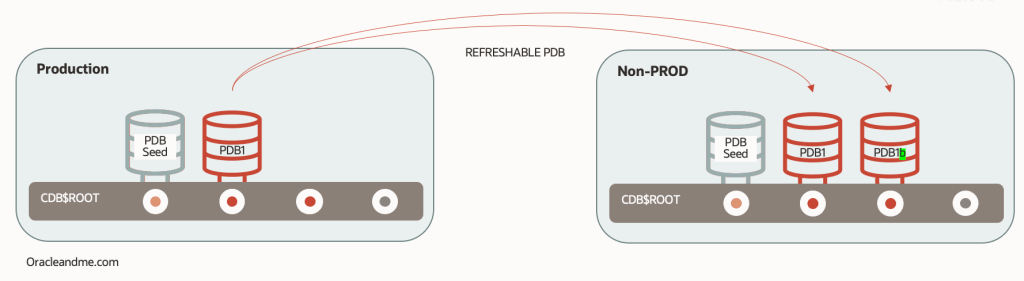
SQL> create pluggable database PDB1 from PDB1@dblinktoCDB1 refresh mode manual;
SQL> alter pluggable database PDB1 open read only; — all ok?
SQL> alter pluggable database PDB1 close immediate; — closing for refresh
SQL> alter pluggable database PDB1 refresh; –we will do N refreshes
— once we are ready to convert it to read-write:
SQL> alter pluggable database PDB1 refresh mode none;
SQL> alter pluggable database PDB1 open read write;
— now we fire up the second refreshable to start preparing a future refresh
SQL> create pluggable database PDB1b from PDB1@dblinktoCDB1 refresh mode manual; — Refresh N times
— Once we are ready to refresh dev env:
— A) Drop old dev PDB1
— B) Convert PDB1b to read-write
— C) Rename PDB1b to PDB1
— And start a new refreshable PDB…
Is that efficient?. Well, it depends on your goals. There is no good or bad solution; just a solution that suits your needs. This solution is time-efficient, as it takes little time to have a refreshed dev environment – following the example. But probably not so flexible. And a bit ugly. And requires lots of work.
A finer approach for this example, instead of consuming the refreshable PDBs directly, is to keep one single refreshable PDB created in the development environment, and recreate any development databases from it. This refreshable database would be our “refresh bastion”, and could be used for the recreation of not just one database, but all databases that need to be refreshed from the production database.

SQL> create pluggable database Bastion from PDB1@dblinktoCDB1 refresh mode manual;
SQL> alter pluggable database Bastion open read only; — all ok?
SQL> alter pluggable database Bastion close immediate; — closing for refresh
SQL> alter pluggable database Bastion refresh; –we will do N refreshes SQL> create pluggable database PDB1 from Bastion;
SQL> create pluggable database PDB2 from Bastion;
However, the weakness of the previous approach is that the recreation time of the development database increases again. Not as much as when copying the production database completely over the network, but we still have to copy it completely from the refreshable PDB that is in its own container. Yes, it’s a local copy; but it’s a full copy.
Now look at the following strategy, where we combine a refreshable PDB bastion with the use of snapshot clones:

SQL> create pluggable database Bastion from PDB1@dblinktoCDB1 refresh mode manual;
SQL> alter pluggable database Bastion open read only; — all ok?
SQL> alter pluggable database Bastion close immediate; — closing for refresh
SQL> alter pluggable database Bastion refresh; –we will do N refreshes SQL> create pluggable database PDB1 from Bastion snapshot copy;
SQL> create pluggable database PDB2 from Bastion snapshot copy;
As I was saying before, we will not go into the details of each operation now, including the snapshots clones. There will be further detailed posts for that. For the time being, it is enough to know that a snapshot clone is a read-write clone of another database without the need to duplicate/clone it’s datafiles; the PDB snapshot clone will point to the datafiles of its reference database (which in this case turns out to be a refreshable PDB) and will only save its modifications in its own local datafiles. This means that creating a snapshot clone is a very fast operation, regardless of the DB size. In fact, the time it takes will basically depend on the time it takes to create its own temporary tablespace and UNDO tablespace.
The combination of these two features makes the refresh of the development environment (following our particular example) not only flexible but also much faster:
1.- Make a last refresh of the refreshable PDB. Time needed: The time it takes to receive the archivelogs generated in the source database since the last refresh and to apply them.
2.- Create as many clone read-write snapshots as we need.
And now you might be thinking: what happens to the snapshot clones if we need to refresh the refreshable PDB (currently, its parent database)? Well, depending on the storage technology we are using we may be able to refresh the refreshable PDB even if the snapshot clones are still opened read-write. Sounds somewhat impossible, right?. A very interesting and probably little known topic for another post.
Hopefully this simple use case has served to show the great flexibility that can be obtained from combining different PDB operations, and to spark your imagination to find new solutions for your DB lifecycle operations.


One response to “19c Basic Multitenant operation combinations”
[…] PDBs (you may want to check my older posts to recap) let you perform a remote full clone while source PDB is still fully operational, then […]
LikeLike